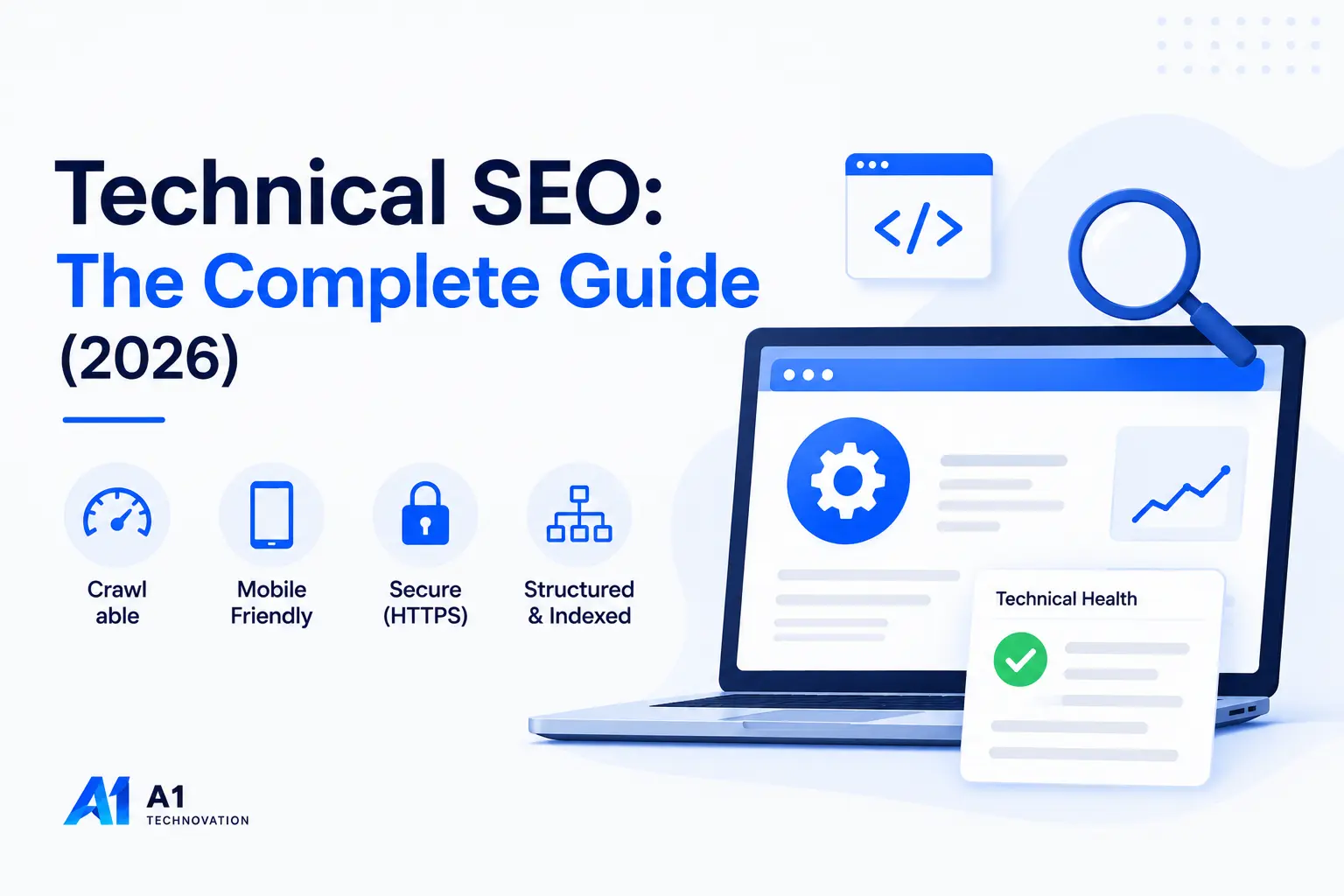
Most websites do not lose Google traffic because of bad content. They lose it because Google cannot properly access, render, or understand that content in the first place.
We have audited over 150 client sites at A1 Technovation since 2018. The most common root cause of ranking failures is almost never the writing. It is the infrastructure under it. Broken crawl paths. Missing canonical tags. Core Web Vitals failing on mobile. Pages indexed that should not be. Pages not indexed that should be.
Technical SEO fixes all of that. Done right, it gives your content a real chance to compete. This guide covers every technical SEO concept that matters in 2026, from crawling and indexing through site architecture, Core Web Vitals, HTTPS, structured data, mobile SEO, duplicate content, redirects, and AI search optimization. If you need the broader foundation first, start with our What Is SEO guide.
1. Technical SEO Explained - The Foundation You Cannot Skip
Technical SEO is the process of optimizing a website's infrastructure so search engines can crawl, render, index, and rank it effectively. It covers everything from server configuration and URL structure to page speed, security certificates, and structured data. For done-for-you implementation, see our SEO services.
The 3 Pillars of Modern SEO
Technical SEO provides the foundation that allows On-Page and Off-Page efforts to succeed.
Think of it this way. On-page SEO shapes the content on a page. Off-page SEO builds authority through links. Technical SEO controls whether any of that work actually reaches Google.
Technical SEO vs. On-Page SEO vs. Off-Page SEO
| Type | Focus Area | Examples |
|---|---|---|
| Technical SEO | Site infrastructure and crawlability | Robots.txt, sitemaps, page speed, HTTPS, schema |
| On-Page SEO | Content and page-level optimization | Headings, keyword placement, meta tags, copy |
| Off-Page SEO | Authority signals from other sites | Backlinks, brand mentions, digital PR |
The Three Jobs Technical SEO Must Accomplish
Every technical SEO task falls under one of these three outcomes:
- Crawlability - Google must be able to reach your pages through clean paths, without being blocked or misdirected.
- Indexability - Google must be able to store, understand, and assign value to your pages.
- Rankability - Your technical foundation must support fast load times, strong UX signals, and structured data that helps Google trust and serve your content.
Skip any one of these, and even the best content strategy underperforms.
Technical Issues That Kill Rankings
Over 7 years of auditing client sites, we have seen the same issues cause the most damage:
- CSS and JavaScript blocked in robots.txt, preventing Google from rendering the page fully
- TTFB above 800ms on shared hosting pushing LCP over the 4s threshold
- Duplicate pages across HTTP, HTTPS, www, and non-www versions splitting link equity four ways
- Redirect chains with three or more hops adding load time and losing PageRank at each hop
- Staging environment accidentally left indexable post-launch
- Missing canonical tags on paginated e-commerce pages creating hundreds of near-duplicate URLs
Each of these is fixable once you know where to look. The audit process in Section 13 shows exactly how to find them.
2. Crawling and Crawl Budget - Getting Google In the Door
How Googlebot Crawls Your Site
Google uses automated crawlers called Googlebot to discover and re-crawl web pages. Googlebot follows links from page to page, collects HTML, renders JavaScript, and sends the processed data back to Google's servers for indexing.
The Search Engine Crawl Journey
Three factors influence how often Googlebot visits a page:
- Crawl demand - how much interest Google has in the URL based on popularity and freshness signals
- Crawl rate limit - how fast your server can respond without being overwhelmed
- Link equity - pages with more internal and external links pointing to them get crawled more frequently
Crawl Budget: When It Matters
Crawl budget refers to the total number of pages Googlebot will crawl on your site within a given period. For most small sites under 1,000 pages, crawl budget is rarely a concern. For large e-commerce stores, news sites, or any site with dynamic URL generation, it becomes a real ranking factor.
Signs your site has a crawl budget problem:
- New pages take weeks to appear in Google Search Console
- Your site has thousands of parameter URLs (e.g.,
?sort=price&color=red) - GSC Coverage shows a large number of "Crawled - currently not indexed" pages
- Log file analysis shows Googlebot spending most time on low-value pages
How to Optimize Crawl Budget
- Block low-value URLs in robots.txt - session IDs, URL parameters, filtered pages, staging paths
- Fix crawl traps - infinite pagination, calendar archives, faceted navigation generating millions of URL combinations
- Resolve all broken internal links - every 404 costs a crawl request without giving Google anything useful
- Reduce redirect chains - each hop costs crawl budget and dilutes PageRank
- Submit a clean, accurate XML sitemap - this tells Google which pages deserve crawl priority
- Add internal links to new or high-priority pages from established, frequently crawled pages
3. robots.txt and XML Sitemaps
robots.txt: The Crawl Gatekeeper
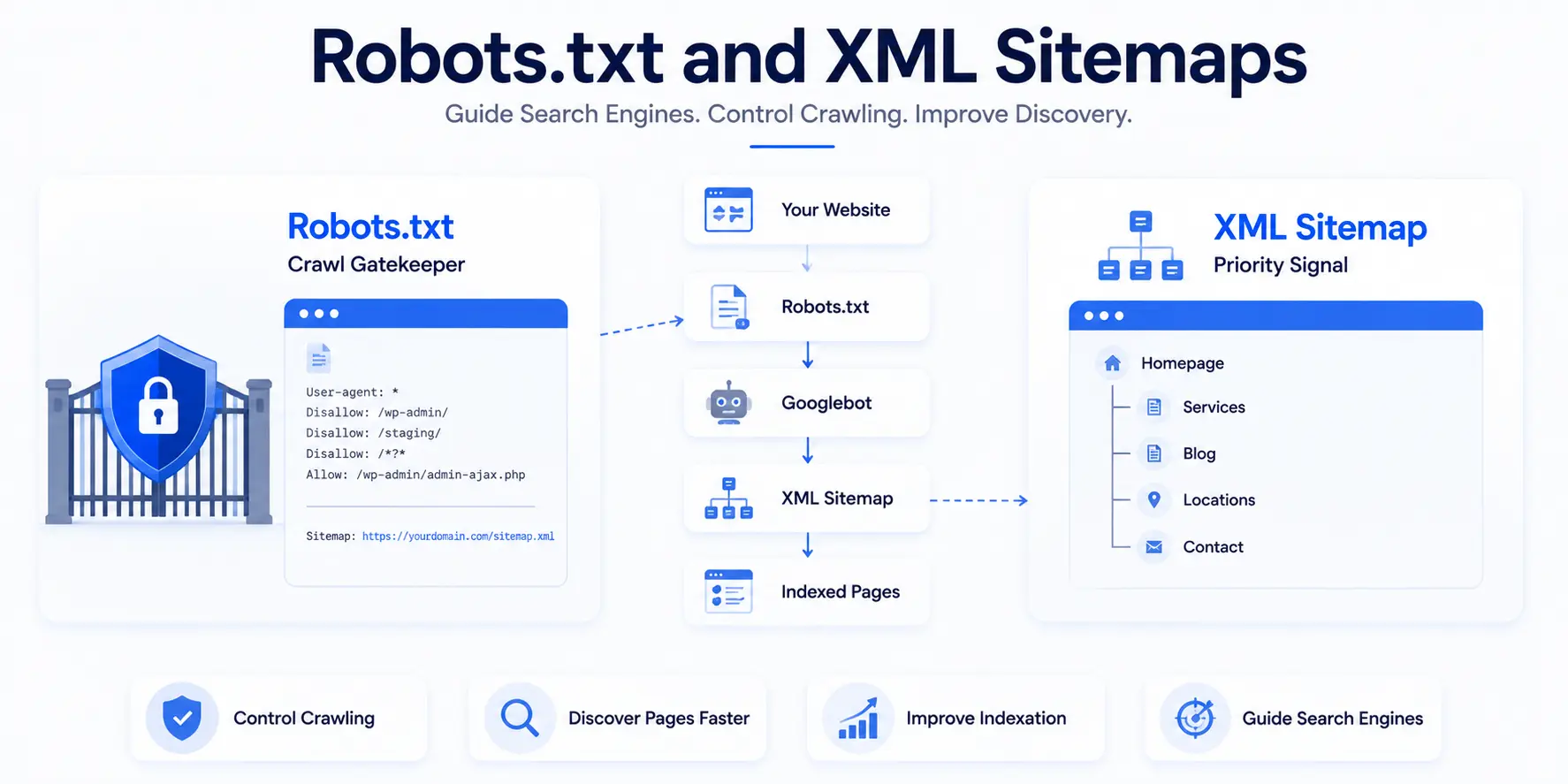
The robots.txt file lives at yourdomain.com/robots.txt. It tells search engine crawlers which parts of your site to crawl and which to skip.
Common directives:
User-agent: *
                        Disallow: /wp-admin/
                        Disallow: /staging/
                        Disallow: /*?*
                        Allow: /wp-admin/admin-ajax.php

                        Sitemap: https://yourdomain.com/sitemap.xml
Critical mistakes to avoid:
- Blocking
/wp-content/or/wp-includes/- this prevents Google from rendering your CSS and JavaScript, causing your pages to appear broken in Google's eyes - Using
noindexin robots.txt - it does not work there. Noindex belongs in the HTML<meta name="robots">tag - Blocking your entire site during development and forgetting to remove it at launch (we have seen this cost clients months of lost traffic)
XML Sitemaps: Your Priority Signal to Google
An XML sitemap lists the URLs on your site you want Google to discover and crawl. It is not a guarantee of indexation - but it shortens the time for Google to find new or updated content.
Sitemap best practices:
- Include only canonical, indexable URLs that return a 200 status code
- Exclude: noindex pages, 404 pages, redirected URLs, thin or duplicate pages
- File size limit: 50,000 URLs or 50MB uncompressed per sitemap file
- Use a sitemap index file for large sites to split by content type (blog, products, locations)
- Submit your sitemap in Google Search Console under the Sitemaps report
- Update the
<lastmod>tag only when content genuinely changes - do not set it dynamically just to trigger crawling
Where to reference your sitemap:
Add it to both robots.txt and Google Search Console. This way Googlebot always knows where to find it, even on a first visit. If you are setting GSC up from scratch, follow our Google Search Console setup guide.
4. Indexing and Index Coverage - Making Sure Google Keeps Your Pages
How Google Decides to Index a Page
Crawling a page and indexing a page are two different actions. Google crawls billions of pages but only indexes the ones it considers valuable enough to store and serve.
Google evaluates a page for indexation based on:
- Unique content value relative to other indexed pages
- Quality signals - thin content, duplicate content, and pages with minimal information gain are frequently excluded
- Internal and external links pointing to the page
- Mobile-first rendering quality
- Whether a noindex tag, X-Robots-Tag header, or canonical pointing elsewhere is present
Common Indexing Issues and Fixes
| Issue | Likely Cause | Fix |
|---|---|---|
| Crawled - currently not indexed | Thin content, low perceived value, no internal links | Improve content depth, add entity coverage, add internal links |
| Discovered - currently not indexed | Crawl budget shortage or low priority | Add internal links from high-authority pages, improve page quality |
| Noindex on live page | Developer tag left on after launch | Audit meta robots tags with Screaming Frog |
| Excluded by canonical | Canonical pointing to a different URL | Verify canonical is correct and intentional |
| Soft 404 | Page returns 200 but Google sees it as empty or unhelpful | Add meaningful content or redirect to a relevant existing page |
Google Search Console Coverage Report
The GSC Coverage report (now called the Indexing report in the updated interface) shows you exactly which URLs Google found, why some are excluded, and which have errors. Check it weekly on active sites.
Priority actions:
- Fix all Error status URLs first - these are confirmed problems
- Review all Excluded URLs - some exclusions are correct (noindex pages), others signal problems
- Watch for large-scale drops in Valid URLs, which can indicate a penalty, crawl block, or mass deindexation
5. Site Architecture and Internal Linking
Hub and Spoke Architecture
A well-structured site helps Google understand the relationship between pages and distributes ranking signals efficiently. We use a hub and spoke model across all our client sites at A1 Technovation.
The Hub and Spoke Model
The hub is your main topic page - like this guide. The spokes are supporting articles that cover sub-topics in depth. Spokes link to the hub. The hub links back to spokes. This creates a closed loop of crawl equity and topic authority.
Example architecture for an SEO agency:
/services/technical-seo/          <- Hub
                          /blog/technical-seo-audit/      <- Spoke
                          /blog/core-web-vitals-guide/    <- Spoke
                          /blog/schema-markup-guide/      <- Spoke
                          /blog/robots-txt-guide/         <- Spoke
URL Structure Best Practices
Clean URLs help both users and search engines understand the page before clicking.
Rules we follow on every client site:
- All lowercase:
/technical-seo-guide/not/Technical-SEO-Guide/ - Hyphens between words, never underscores
- Keyword in the URL, not a date or ID number
- Maximum 3-4 folders deep from the homepage
- Trailing slash applied consistently - pick one and 301 the other
Good URL: a1technovation.com/blog/technical-seo-guide Bad URL: a1technovation.com/blog/2024/11/post-id-4328
Internal Linking for Crawl Equity
Every internal link is a vote of importance. Google's Reasonable Surfer model estimates which links a real user would click and assigns more value to contextual, in-content links over footer or sidebar links.
Internal linking rules we apply to every site:
- Every new pillar page gets at least 5 to 10 internal links from related existing content
- Anchor text must be descriptive - use "our technical SEO audit process" not "click here"
- No orphan pages - every page must have at least one internal link pointing to it
- Deep internal links matter more than homepage links for distributing equity to sub-pages
Breadcrumbs and BreadcrumbList Schema
Breadcrumbs show users and Google where a page sits in the site hierarchy. They appear in Google search results and improve click-through rate by giving users path context before they visit.
Add BreadcrumbList JSON-LD on every page:
{
                          "@context": "https://schema.org",
                          "@type": "BreadcrumbList",
                          "itemListElement": [
                            {"@type": "ListItem", "position": 1, "name": "Home", "item": "https://a1technovation.com/"},
                            {"@type": "ListItem", "position": 2, "name": "Blog", "item": "https://a1technovation.com/blog/"},
                            {"@type": "ListItem", "position": 3, "name": "Technical SEO Guide", "item": "https://a1technovation.com/blog/technical-seo-guide/"}
                          ]
                        }
6. HTTPS and Site Security - A Direct Ranking Signal
HTTPS Is a Confirmed Google Ranking Factor
Google confirmed HTTPS as a ranking signal in 2014. Since then, Chrome marks HTTP pages as "Not Secure" in the address bar. That label kills trust and directly reduces CTR, regardless of content quality.
Every page on your site must serve over HTTPS, including images, scripts, stylesheets, and fonts. Serving any resource over HTTP on an HTTPS page creates mixed content - a security warning that some browsers block automatically.
Migrating to HTTPS Without Losing Rankings
We have migrated dozens of client sites from HTTP to HTTPS at A1 Technovation. Here is the exact process we follow:
- Get an SSL certificate - free via Let's Encrypt, or included with most CDN and hosting providers
- Install and configure it on your server or through your host's control panel
- Set up 301 redirects from all HTTP pages to their HTTPS equivalents
- Update all internal links and canonical tags to use HTTPS URLs
- Update your XML sitemap to reference HTTPS URLs only
- Verify your HTTPS property in Google Search Console and re-submit your sitemap
Timeline: Google typically re-crawls redirected pages within 1 to 4 weeks. Rankings rarely drop if the migration is done correctly. They sometimes improve once the security signals register.
Redirect Chains and Loops
A redirect chain happens when URL A redirects to URL B, which redirects to URL C. Each hop adds load time and dilutes the PageRank passed through the chain.
Common chain pattern post-migration:
http://domain.com -> https://domain.com -> https://www.domain.com -> https://www.domain.com/That is three hops. Fix it to one:
http://domain.com -> https://www.domain.com/ (direct 301)A redirect loop happens when the redirect path circles back to itself. This causes a browser error and stops Googlebot cold. Fix loops by auditing all redirect rules in your .htaccess file or hosting redirect manager.
7. Canonical Tags and Duplicate Content
Duplicate Content: The Signal-Splitting Problem
Google does not penalize duplicate content as a manual action. Instead, it consolidates. When the same or very similar content exists on multiple URLs, Google picks one version to rank and largely ignores the others.
The problem is Google may pick the wrong version. When that happens, your preferred page loses visibility to a URL you never intended to rank.
Common causes of duplicate content:
- HTTP vs. HTTPS:
http://domain.com/pageandhttps://domain.com/pageare two different URLs - www vs. non-www:
www.domain.com/pageanddomain.com/pageare separate - Trailing slash:
/page/and/pageare technically different - URL parameters:
/products?sort=priceduplicates/products - Paginated pages:
/category/page/2may replicate much of/category/ - Session IDs:
/page?sessionid=abc123creates a new URL per user
The Canonical Tag
The canonical tag tells Google which URL is the preferred version of a page. Place it in the <head> section of every page:
<link rel="canonical" href="https://a1technovation.com/blog/technical-seo-guide/" />Every page should have a self-referencing canonical - even pages with no duplicates. This prevents Google from making its own canonicalization decision based on signals you cannot control.
Canonical vs. 301 Redirect - Choosing the Right Tool
| Situation | Use |
|---|---|
| Old URL must stay live (e.g., AMP page, shared link) | Canonical tag |
| Old URL is dead and should never be served | 301 Redirect |
| Content syndicated on another domain | Cross-domain canonical pointing to original |
| Near-duplicate filtered pages (e-commerce facets) | Canonical pointing to main category page |
| Paginated series | Self-referencing canonical on each page |
The key distinction using WSD (Word Sense Disambiguation): "Canonical" here means the preferred, authoritative URL - not to be confused with "canonical" as in a standard or rule. The canonical tag is a directive to Google, not a technical redirect. It consolidates signals without changing what the user sees in their browser.
8. Redirects - Getting Them Right
301 vs. 302 Redirects
| Redirect Type | Meaning | SEO Impact |
|---|---|---|
| 301 Permanent | Page moved permanently to new URL | Passes approximately 99% of link equity to new URL |
| 302 Temporary | Page moved temporarily | Google may continue to index original URL |
| 307 Temporary (HTTP/1.1) | Same as 302 but protocol-specific | Same as 302 for SEO purposes |
| 410 Gone | Page permanently removed | Signals to Google to drop the page faster than a 404 |
Use 301 for all permanent URL changes. Use 302 only when the change is genuinely temporary - like a seasonal promotion page.
Avoiding Redirect Chain Problems
Every redirect chain you create costs crawl budget and dilutes equity. Our rule at A1 Technovation: always redirect directly to the final destination URL. Never chain through an intermediate step.
Redirect Chains: Bad vs Good Practice
Audit redirects with:
- Screaming Frog: Crawl > Response Codes > filter for 301/302, then check "Redirect To" column for further redirects
- Ahrefs Site Audit: the Redirects report flags chains automatically
- Google Search Console URL Inspection: shows the final URL Google resolves to
9. Site Speed and Core Web Vitals - Performance Is a Ranking Signal
Core Web Vitals are Google's three standardized metrics for measuring real-user page experience. They became a ranking factor in June 2021. Failing the "Good" threshold does not automatically drop your rankings, but it becomes a tiebreaker when two sites are otherwise equal in content and authority.

The Three Core Web Vitals in 2026
2026 Core Web Vitals Thresholds
| Metric | Measures | Good | Needs Work | Poor |
|---|---|---|---|---|
| LCP (Largest Contentful Paint) | How fast the largest visible element loads | Under 2.5s | 2.5s to 4.0s | Over 4.0s |
| INP (Interaction to Next Paint) | How fast the page responds to user input | Under 200ms | 200ms to 500ms | Over 500ms |
| CLS (Cumulative Layout Shift) | Visual stability during page load | Under 0.1 | 0.1 to 0.25 | Over 0.25 |
Important 2026 update: INP replaced FID (First Input Delay) as the responsiveness metric in March 2024. Many guides still list FID. If a competitor's guide mentions FID as a current Core Web Vitals metric, their data is outdated.
Fixing LCP (Loading Speed)
LCP measures the time from page load start to when the largest content element - usually a hero image or H1 text block - becomes visible.
Fastest LCP wins:
- Compress hero images and serve them in WebP or AVIF format
- Add
<link rel="preload" as="image" href="/hero.webp">in the<head>to load the LCP image before the browser finishes parsing the page - Improve server response time - aim for TTFB under 800ms. If your server takes 1.2s to respond, your LCP will never hit 2.5s no matter how much you optimize the image
- Use a CDN to serve assets from servers geographically close to users
- Remove or defer render-blocking scripts loaded in the
<head>tag
Fixing CLS (Visual Stability)
CLS measures how much the page layout shifts during loading. A score above 0.1 means visible elements are jumping around, which frustrates users and signals poor quality to Google.
Most common CLS causes and fixes:
- Images without width and height attributes: add
width="800" height="400"to every image tag so the browser reserves space before the image loads - Web fonts causing text swap: use
font-display: optionalorfont-display: swapin your CSS - Ads and embeds loading without reserved space: set a minimum height container around ad slots
- Late-loading content injected above existing content: restructure your JavaScript load order
Fixing INP (Responsiveness)
INP measures the delay between a user action (click, tap, keypress) and the next visible update on the page. High INP usually comes from JavaScript blocking the main thread.
Fixes:
- Break long tasks into smaller chunks using
setTimeoutorrequestIdleCallback - Defer non-critical third-party scripts (chat widgets, analytics, social embeds) until after user interaction
- Remove JavaScript that runs on every user event and performs expensive DOM updates
Tools to Measure Core Web Vitals
| Tool | Data Type | Best For |
|---|---|---|
| Google PageSpeed Insights | Lab + Field (CrUX) | Quick per-page check |
| GSC Core Web Vitals Report | Field (real users) | Site-wide view of passing vs failing URLs |
| Chrome DevTools Lighthouse | Lab | Diagnosing root causes |
| WebPageTest | Lab + waterfall | Deep-dive load analysis |
| Chrome UX Report (CrUX) | Field | Competitive benchmarking |
10. Mobile SEO and Mobile-First Indexing

Mobile-First Indexing Is the Default
Since 2023, Google indexes the mobile version of every website first. Your desktop site is secondary. If your mobile pages show less content, hide structured data, or strip out sections via CSS display: none, Google ranks you on that thinner mobile version.
We have seen this cost clients real traffic. One e-commerce client we audited had structured data on desktop but missing from their mobile template entirely. Their rich results disappeared from search within weeks of mobile-first indexing taking effect.
Responsive Design Is the Recommended Approach
Google recommends responsive design - one URL that adjusts its layout via CSS media queries depending on screen size. This avoids canonicalization issues and keeps structured data consistent across devices.
Responsive design vs. alternatives:
| Method | How It Works | SEO Risk |
|---|---|---|
| Responsive design | One URL, CSS adjusts layout | Lowest risk, Google's recommended approach |
| Dynamic serving | One URL, server delivers different HTML | Requires Vary: User-Agent header; risky if misconfigured |
| Separate mobile URL | m.domain.com or domain.com/mobile/ | Requires careful canonical and annotation tags |
Mobile Technical Checklist
- Viewport meta tag present:
<meta name="viewport" content="width=device-width, initial-scale=1"> - All content visible on mobile - no content hidden with
display: nonethat is present on desktop - Tap targets (buttons, links) at minimum 48x48px with 8px spacing between them
- Font size minimum 16px to prevent users from pinching to zoom
- No horizontal scrolling at any common screen width
- Structured data and schema markup present on mobile version (not just desktop)
- Same title tags, meta descriptions, and canonical tags on both versions
11. Structured Data and Schema Markup
Structured Data vs. Schema vs. Rich Results
These three terms get used interchangeably but they mean different things:
- Structured data is the format used to mark up content - JSON-LD is Google's recommended format
- Schema markup is the vocabulary - schema.org defines the types (Article, FAQPage, Product, Organization) and properties
- Rich results are the reward - star ratings, FAQ dropdowns, breadcrumb paths, and sitelinks that appear in Google search results when structured data is implemented correctly
Schema Types That Have the Highest Impact in 2026
| Schema Type | Pages to Use On | Rich Result Potential |
|---|---|---|
| Article | All blog posts | Author, date, headline in search result |
| FAQPage | All pages with FAQ sections | Expandable Q&A directly in SERPs |
| HowTo | Step-by-step guides | Numbered steps shown in SERP |
| BreadcrumbList | Every page | Site path shown in URL line |
| Organization | Homepage | Brand knowledge panel signals |
| LocalBusiness | Location and contact pages | Address, hours, Google Maps integration |
| Product | E-commerce product pages | Price, availability, review stars |
| Person | Author profile pages | Author knowledge panel, E-E-A-T signals |
How to Implement Article + FAQPage JSON-LD
Place this in the <head> or just before </body> of your blog posts:
{
                          "@context": "https://schema.org",
                          "@type": "Article",
                          "headline": "Technical SEO: The Complete Guide (2026)",
                          "author": {
                            "@type": "Person",
                            "name": "Likhon Ahmed",
                            "url": "https://a1technovation.com/about/",
                            "sameAs": ["https://linkedin.com/in/likhon-ahmed"]
                          },
                          "publisher": {
                            "@type": "Organization",
                            "name": "A1 Technovation",
                            "url": "https://a1technovation.com",
                            "logo": {
                              "@type": "ImageObject",
                              "url": "https://a1technovation.com/logo.png"
                            }
                          },
                          "datePublished": "2026-06-01",
                          "dateModified": "2026-06-01",
                          "mainEntityOfPage": {
                            "@type": "WebPage",
                            "@id": "https://a1technovation.com/blog/technical-seo-guide/"
                          }
                        }
Add a separate FAQPage block for FAQ sections. Do not combine them into one object.
Structured Data for AI Search Citation
Schema markup directly improves your visibility in AI-generated answers. Here is why:
Google AI Overviews, Perplexity, and ChatGPT all retrieve passages from indexed web pages. FAQPage schema structures your content as explicit question-answer pairs, which are the exact format AI retrieval systems prefer. Named entities in your schema - your brand name, author, dates, and specific claims - increase the salience of your content in large language model training and retrieval.
In our work across 150+ client sites, we consistently see that pages with clean Article + FAQPage schema earn 2 to 4 times more AI Overview appearances than structurally identical pages without schema.
Validating Your Schema
Use these tools before publishing any new schema:
- Google Rich Results Test (search.google.com/test/rich-results) - tests any URL or raw code, shows which rich results you are eligible for
- Schema Markup Validator (validator.schema.org) - more thorough check of schema.org compliance
- GSC Enhancements Report - shows live errors and warnings on schema Google has already found on your site
Fix every error before publishing. Warnings are optional. Errors mean Google will not show your rich results.
12. Technical SEO for AI Search - The Layer Most Guides Miss
This section covers what no other technical SEO guide in the current top 10 addresses: how to make your site technically ready for AI search engines in 2026.
Technical SEO Has a New Job
Google AI Overviews, Perplexity, ChatGPT, and Gemini all pull answers from indexed web pages. Getting cited in these answers is not separate from technical SEO. It is the next layer of it, and it connects directly with AEO optimization and GEO optimization.
AI engines do not rank pages. They retrieve passages. A technically sound page that answers questions in self-contained, structured passages gets cited. A page that buries its answers in long paragraphs, loads slowly, or lacks structured data gets skipped.
Passage Indexing and Retrieval-Ready Content Structure
Google introduced passage indexing in 2021. It can now rank individual sections of a page, not just the page as a whole. AI retrieval systems work the same way.
For a passage to be retrievable, it must:
- Open with the direct answer to the question it targets
- Be self-contained - a reader (or an AI) should understand it without reading the rest of the page
- Use specific named entities: brand names, dates, statistics, proper nouns
- Use clean H2 and H3 hierarchy with descriptive headings that signal what each passage covers
Example of a retrieval-ready passage structure:
H2: Core Web Vitals in 2026
                        [Direct definition in first sentence]
                        [Specific metric names: LCP, INP, CLS]
                        [Numeric thresholds with units]
                        [Source-ready specificity]
This is also the structure that earns featured snippets, PAA boxes, and AI Overview citations.
Technical Signals That Help AI Engines Cite You
- Clean semantic HTML - H1 > H2 > H3 hierarchy with no skipped heading levels
- FAQPage schema - structures Q&A content for direct AI retrieval
- Named entities - specific people, organizations, products, dates, and statistics increase entity salience in LLM processing
- Fast page speed - AI crawlers operate with tight retrieval budgets; slow pages get crawled less
- HTTPS with no mixed content - security signals carry into AI indexing pipelines
- Author entity schema - Person JSON-LD with
sameAslinks to LinkedIn, Wikipedia, or authoritative profiles signals credibility to AI retrieval systems llms.txtfile - a new emerging standard that tells AI crawlers which content to include or exclude from retrieval
The llms.txt File
Similar to robots.txt for traditional search crawlers, llms.txt is a plain text file at your root domain that guides AI crawlers. It is not yet a universal standard, but Perplexity, Anthropic's Claude, and several other AI systems support it.
Place the file at yourdomain.com/llms.txt. At minimum, include:
# llms.txt for a1technovation.com

                        ## Technical SEO Resources
                        - [Technical SEO Guide](https://a1technovation.com/blog/technical-seo-guide/)
                        - [Core Web Vitals Guide](https://a1technovation.com/blog/core-web-vitals-guide/)

                        ## Services
                        - [Technical SEO Services](https://a1technovation.com/services/technical-seo/)
We add this file to every client site we manage as part of our standard AEO setup.
13. Running a Technical SEO Audit
Our Four-Phase Audit Process
After auditing 150+ sites at A1 Technovation, we follow the same four-phase process on every new client engagement. It is repeatable, prioritized, and built around real impact.
Phase 1: Crawl the site Use Screaming Frog (paid, $260/year) or Ahrefs Site Audit. Enable JavaScript rendering. Set crawl depth to unlimited. Download all responses including 3xx, 4xx, and 5xx codes.
Phase 2: Check indexation in Google Search Console Pull the full Coverage/Indexing report. Export all Excluded and Error URLs. Match these against the crawl data to identify discrepancies between what is live and what Google sees.
Phase 3: Measure performance Run PageSpeed Insights on your top 10 landing pages. Pull the GSC Core Web Vitals report for a site-wide view. Flag every URL with LCP above 2.5s, INP above 200ms, or CLS above 0.1.
Phase 4: Prioritize by impact, not by count A site might have 400 missing alt text issues and 2 accidental noindex tags on high-traffic pages. Fix the 2 noindex issues first. They affect ranking directly. The alt text issues can go into a queue.
Priority Issue Matrix
| Issue | Impact | Fix Speed | Priority |
|---|---|---|---|
| Noindex on live high-value page | Critical - page not in index | Under 30 minutes | P0 - Fix today |
| 4xx errors on internally linked pages | High - crawl waste, broken UX | 1 to 2 hours | P0 - Fix this week |
| Redirect chains (3+ hops) | High - crawl budget and PageRank loss | 1 to 2 hours | P0 - Fix this week |
| Missing canonical on duplicate URLs | High - signal consolidation | 2 to 4 hours | P1 - Fix this month |
| LCP above 4.0s on top landing pages | High - UX and ranking signal | 4 to 8 hours | P1 - Fix this month |
| Missing Article or FAQ schema | Medium - lost rich results | 1 to 2 hours | P2 - Fix this quarter |
| Broken internal links | Medium - crawl and UX | 2 to 3 hours | P2 - Fix this quarter |
| Missing alt text | Low - accessibility and image SEO | Ongoing | P3 - Batch fix |
Recommended Audit Tools
| Tool | Best For | Cost |
|---|---|---|
| Screaming Frog | Full crawl, custom extraction, JS rendering | Free up to 500 URLs; $260/year |
| Google Search Console | Real Google indexation, CWV, and coverage data | Free |
| PageSpeed Insights | Per-page Core Web Vitals | Free |
| Google Rich Results Test | Schema validation | Free |
| Ahrefs Site Audit | 170+ issue types, JS rendering, scheduled crawls | Paid |
| Semrush Site Audit | Issue prioritization, thematic reports | Paid |
| Chrome Lighthouse | In-browser performance and accessibility | Free |
| WebPageTest | Waterfall analysis, connection simulation | Free |
Audit Cadence
- New site: Full audit before launch, then again 30 days after go-live
- Active site: Automated crawl monthly, full manual audit quarterly
- After migration: Full crawl within 48 hours of go-live
- After CMS update: Immediate crawl to catch broken URL rewrites or changed template logic
14. Technical SEO Checklist - 2026 Edition
Use this checklist for every site audit. Group fixes by priority tier before assigning work. For a more action-focused version, use our technical SEO checklist.
Crawling and Indexing
- robots.txt is live, correctly formatted, and not blocking CSS, JavaScript, or important page paths
- XML sitemap is submitted to Google Search Console and contains only canonical 200-status URLs
- No valuable pages have a
noindextag that should not be there - GSC Coverage/Indexing report shows only expected exclusions
- URL parameters, session IDs, and faceted navigation URLs are blocked or canonicalized
Site Architecture
- URL structure uses lowercase letters, hyphens, and descriptive keywords
- No page sits more than 3 clicks from the homepage
- All pillar pages receive at least 5 to 10 internal links from related content
- Zero orphan pages (no pages with zero internal links pointing to them)
- BreadcrumbList JSON-LD is on all pages and validated
Security and HTTPS
- All pages serve HTTPS including all assets (images, scripts, fonts)
- Zero mixed content warnings in browser developer tools
- HTTP-to-HTTPS redirect resolves in a single 301 hop
- SSL certificate is valid and does not expire within 30 days
Core Web Vitals and Performance
- LCP is under 2.5s on all major landing pages
- INP is under 200ms sitewide
- CLS is under 0.1 on all pages
- Hero images use WebP or AVIF format and are preloaded
- Render-blocking JavaScript is deferred or loaded async
- GZIP or Brotli compression is active at the server level
- CDN is in place for international or geographically distributed audiences
Mobile SEO
- Viewport meta tag is correct on all pages
- Mobile version shows the same content, schema, and meta tags as desktop
- All tap targets meet 48x48px minimum
- No horizontal scrolling at standard mobile widths
- Font size is 16px minimum
Canonical Tags and Duplicate Content
- Every page has a self-referencing canonical tag
- No canonical conflicts (canonical pointing to a noindex page or forming a chain)
- www vs. non-www resolves to one canonical version via 301
- URL parameter pages use canonical tags pointing to clean versions
Structured Data
- Article schema on all blog posts (with author Person entity)
- FAQPage schema on all FAQ sections
- Organization schema on homepage
- LocalBusiness schema on location and contact pages
- All schema validates in Google Rich Results Test with zero errors
- BreadcrumbList schema on every page
AI Search Readiness
- Every H2 section opens with a direct answer to a question
- FAQPage schema is implemented on key informational pages
- Named entities (brand, author, specific data points) are stated clearly in content
llms.txtfile is live at the root domain- Author Person JSON-LD with
sameAslinks is on all blog content
15. Frequently Asked Questions
Technical SEO is the process of optimizing a website's infrastructure so search engines can crawl, render, index, and rank it effectively. It covers site speed, mobile optimization, HTTPS, structured data, canonicalization, XML sitemaps, robots.txt, and crawl configuration. Without it, even well-written content and strong backlinks may not translate into rankings.
Technical SEO differs from on-page SEO in scope. On-page SEO covers the content of individual pages - headings, copy, keyword placement, and meta tags. Technical SEO covers the server, code, and architecture that delivers that content to search engines and users. Both are needed, but technical issues block ranking before on-page quality even matters.
Core Web Vitals in 2026 consist of three metrics: LCP (Largest Contentful Paint) for loading speed, INP (Interaction to Next Paint) for responsiveness, and CLS (Cumulative Layout Shift) for visual stability. INP replaced FID as the responsiveness metric in March 2024. Google considers a page "Good" when LCP is under 2.5s, INP is under 200ms, and CLS is under 0.1.
A canonical tag tells Google which URL version is the preferred version of a page when similar or duplicate content exists across multiple URLs. It prevents Google from splitting ranking signals between duplicates. Place it in the <head> as <link rel="canonical" href="[preferred URL]" />. Every page should have a self-referencing canonical.
A technical SEO audit should run at least once per month on active sites using automated crawl tools, plus a full manual review each quarter. Sites that recently migrated, changed their CMS, or added large volumes of new pages should audit within 48 hours of each change.
robots.txt and noindex serve different purposes. robots.txt controls which URLs Googlebot can crawl. Noindex (in the HTML meta robots tag) controls which pages appear in the search index. A page blocked in robots.txt may still appear in the index if external links point to it. Use robots.txt to save crawl budget. Use noindex to remove pages from search results.
XML sitemaps help Google discover pages it might otherwise miss, especially on large, new, or low-linked sites. A sitemap does not guarantee indexation but shortens discovery time for new content. Include only canonical, indexable URLs that return a 200 status. Submit it in Google Search Console.
Technical SEO directly affects AI search visibility because AI engines like Google AI Overviews, Perplexity, and ChatGPT retrieve passages from indexed web pages. Sites with fast load times, clean semantic HTML, FAQPage schema, and named entities get cited more often. Pages that bury answers in long paragraphs without structure rarely appear in AI-generated responses.
Work With Our Technical SEO Team
Our technical SEO team at A1 Technovation has fixed crawl errors, Core Web Vitals failures, duplicate content issues, and indexation problems across 150+ global client sites since 2018.
If your site has traffic it should be earning but is not, a technical issue is often the reason. We offer a focused technical SEO review that covers your crawl health, indexation status, Core Web Vitals, structured data, and mobile performance.
Want a clear implementation roadmap? Explore our technical SEO services or request a free review from the A1 Technovation team.
Turn the technical layer into a working system
These pieces support implementation with a checklist view, stronger fundamentals, and search-mechanics context.
Get a Technical SEO Review From A1 Technovation
Our technical SEO team has fixed crawl errors, Core Web Vitals failures, duplicate content issues, and indexation problems across 150+ global client sites since 2018.
Request a Free Technical SEO Review →