Most technical SEO problems are invisible. Your site looks fine to visitors, but Google's crawlers see a different story entirely.
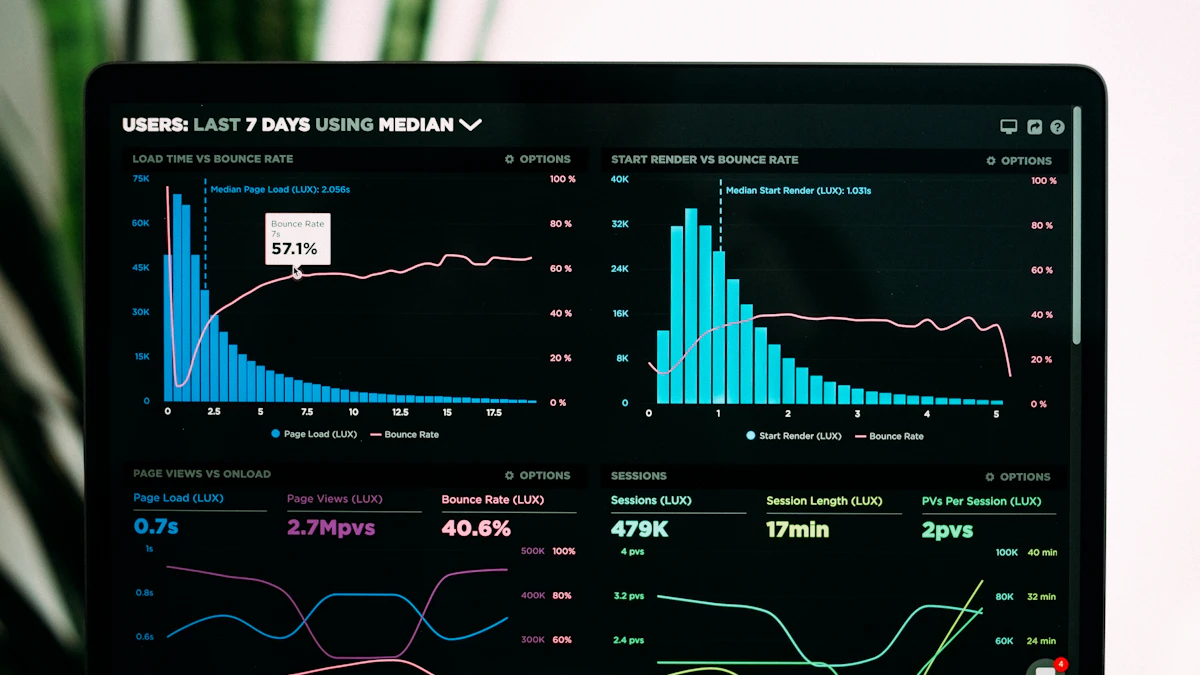
A broken robots.txt rule, a misconfigured canonical tag, a hero image that loads in 4.5 seconds - none of these look like problems from the front end. But each one costs you rankings every single day.
A technical SEO checklist is a prioritized list of backend fixes that improve how search engines crawl, index, render, and rank your site. The 30 fixes in this guide cover crawlability, indexation, Core Web Vitals, structured data, JavaScript rendering, site architecture, mobile-first indexing, HTTPS, and AI search visibility. Each fix includes the ranking mechanism, the specific action, and the tool you need.
At A1 Technovation, we've audited over 150 sites across e-commerce, SaaS, and service industries over the past seven years. The same issues surface again and again. The same fixes move rankings with predictable, measurable results.
This guide gives you those fixes in priority order, starting with the ones that produce the fastest ranking impact and working toward longer-term structural improvements.
Before You Start: How to Use This Checklist
Not every technical fix carries the same ranking weight. Fixing a misconfigured robots.txt file on a 10,000-page e-commerce site can double organic traffic in two weeks. Fixing a missing breadcrumb schema on a five-page brochure site moves the needle far less.
Throughout this guide, each fix is labeled with a priority tier:
- Critical - Fix within 24 hours. These are actively suppressing rankings right now.
- High - Fix within 7 days. Significant ranking signal with measurable impact.
- Medium - Fix within 30 days. Meaningful long-term gains, less urgent.
- Strategic - Fix within 90 days. Future-proofs your site for AI and algorithm shifts.
Tools you'll need: Google Search Console, Screaming Frog or Sitebulb for crawl analysis, Google PageSpeed Insights for Core Web Vitals, and Ahrefs or Semrush for backlink and content data.
Before making any changes, document your current rankings, GSC impressions, and crawl coverage. Set a 90-day measurement window so you can attribute ranking changes to specific fixes with confidence.
The 4-Step Technical Audit Execution Plan
Baseline Data
Record current GSC impressions, rankings, and indexed URLs.
Run Crawls
Crawl with Screaming Frog and check PageSpeed Insights.
Execute Fixes
Deploy fixes following the priority matrix.
90-Day Review
Compare new crawl and GSC data against the baseline.
Section 1: Crawlability Fixes
If Google can't crawl your pages, nothing else in this checklist matters. Crawlability is the foundation. These six fixes address the most common reasons Googlebot fails to reach pages that should rank.
Fix #1: Audit Your robots.txt File
Critical | Time: 30 minutes | Ranking impact: 24 to 48 hours
The ranking mechanism: A single misplaced Disallow: / rule in your robots.txt file can prevent Google from crawling your entire site. No crawl means no index entry. No index entry means no ranking, regardless of how strong your content is.
Navigate to yourdomain.com/robots.txt and read every Disallow rule carefully. Question each one: does this directory actually need to be blocked from crawlers? The most common mistake we see in audits is a staging-environment rule that was copied to production without review, blocking CSS, JavaScript, or entire product directories.
Use Google Search Console's robots.txt tester under Settings to validate individual URLs against your current rules. Fix accidental blocks immediately.
Your robots.txt should also include a Sitemap directive pointing to your XML sitemap. Example: Sitemap: https://yourdomain.com/sitemap.xml
Fix #2: Submit and Validate Your XML Sitemap
Critical | Time: 1 to 2 hours | Ranking impact: 1 to 2 weeks
The ranking mechanism: A clean, accurate XML sitemap tells Google which pages exist and which ones to prioritize for crawling. It compresses the time from publication to indexation, especially for new content or recently updated pages.
Go to Google Search Console, navigate to Sitemaps, and submit your sitemap URL if you haven't already. Then validate it using Screaming Frog's List Mode: paste in your sitemap URLs and run a crawl to check the HTTP status of every URL.
Fix #3: Optimize Crawl Budget for Large Sites
High | Time: 2 to 5 hours | Ranking impact: 4 to 8 weeks
The ranking mechanism: Google allocates a finite crawl budget per site, based on your domain's authority and server capacity. If that budget is consumed by thin pages, parameter-generated URLs, or crawl traps, your most important pages get crawled less often and rank less consistently.
Start with your server log files. Screaming Frog Log Analyzer reveals exactly which pages Googlebot actually visits, how often, and whether those pages are your best or your worst content.
Fix #4: Fix Crawl Errors in Google Search Console
Critical | Time: 2 to 4 hours | Ranking impact: 1 to 3 weeks
The ranking mechanism: Crawl errors tell Google that your site's infrastructure has reliability issues. A site that regularly returns server errors or broken links earns fewer crawl visits over time, which slows down indexation of new and updated content.
- For 404 errors: if the page previously had content, redirect it to the closest relevant live page.
- For 5xx server errors: fix them at the server level, not by adjusting crawl frequency.
- For redirect errors: update the source internal link to point directly to the final destination URL.
Fix #5: Eliminate Redirect Chains and Redirect Loops
High | Time: 2 to 6 hours | Ranking impact: 2 to 4 weeks
The ranking mechanism: Each redirect in a chain introduces a small loss of PageRank transfer. Redirect loops cause crawlers to give up entirely on those URLs.
Fix #6: Keep Every Priority Page Within 3 Clicks of the Homepage
High | Time: 4 to 10 hours | Ranking impact: 4 to 8 weeks
The ranking mechanism: Crawl depth directly correlates with crawl frequency. Pages buried five or more clicks from your homepage receive crawl visits weeks less often than pages two clicks away.
Section 2: Indexation Fixes
Getting crawled is step one. Getting the right pages indexed - and only the right pages - is step two. Indexation errors are where most sites silently bleed ranking potential.
Fix #7: Audit and Fix Canonical Tag Issues
Critical | Time: 3 to 6 hours | Ranking impact: 4 to 6 weeks
The ranking mechanism: A canonical tag tells Google which version of a page is the official one when multiple URLs show similar content. An incorrect canonical points ranking signals at the wrong URL, or splits them between two URLs.
Fix #8: Fix noindex / nofollow Misuse
Critical | Time: 1 to 2 hours | Ranking impact: 1 to 2 weeks
The ranking mechanism: A noindex tag removes a page from Google's index completely. A page carrying noindex cannot rank for any query, regardless of its content quality, backlinks, or internal link equity.
Fix #9: Resolve Duplicate Content Issues
High | Time: 4 to 8 hours | Ranking impact: 4 to 8 weeks
The ranking mechanism: Duplicate content splits ranking signals between multiple URLs showing the same or near-identical content. Google must choose which version to rank, and it often chooses the wrong one.
Fix #10: Handle URL Parameters Correctly
High | Time: 2 to 4 hours | Ranking impact: 4 to 8 weeks
The ranking mechanism: URL parameters create new and unique-looking URLs for content that is essentially identical. Left uncontrolled, this generates hundreds or thousands of near-duplicate pages.
Fix #11: Fix Paginated Content Indexation
Medium | Time: 2 to 4 hours | Ranking impact: 4 to 12 weeks
For category listing pages where page 1 is the primary ranking target, add canonical tags to pages 2 through N pointing back to page 1. This consolidates index signals at page 1 without blocking crawl access to the full content.
Fix #12: Remove Orphan Pages or Pull Them Into Your Site Structure
High | Time: 3 to 6 hours | Ranking impact: 4 to 8 weeks
The ranking mechanism: An orphan page receives zero internal links. Without internal links, Googlebot has no path to discover the page, and it receives no PageRank.

Section 3: Core Web Vitals and Page Speed Fixes
Google confirmed Core Web Vitals as a ranking signal in 2021. These six fixes address the metrics Google uses to measure real-world page experience.
- LCP: under 2.5 seconds
- INP: under 200 milliseconds
- CLS: under 0.1
LCP
Largest Contentful Paint
INP
Interaction to Next Paint
CLS
Cumulative Layout Shift
Fix #13: Fix Largest Contentful Paint
Critical | Time: 4 to 12 hours | Ranking impact: 2 to 6 weeks
For hero images, convert the image to WebP or AVIF and add a <link rel="preload"> tag in the head. Verify that your LCP element is not lazy-loaded.
Fix #14: Fix Interaction to Next Paint
Critical | Time: 4 to 16 hours | Ranking impact: 2 to 6 weeks
Defer or remove non-critical JavaScript, audit third-party scripts, break up long tasks, and reduce the total JavaScript payload on the page.
Fix #15: Fix Cumulative Layout Shift
High | Time: 2 to 6 hours | Ranking impact: 2 to 4 weeks
- Images without explicit dimensions: always add width and height attributes.
- Late-loading ads and embeds: reserve space before they load.
- Web fonts: add
font-display: swap.
Fix #16: Optimize Images
High | Time: 3 to 8 hours | Ranking impact: 2 to 4 weeks
Convert to next-gen formats, apply lazy loading correctly to below-the-fold images, and compress without visible quality loss.
Fix #17: Eliminate Render-Blocking Resources
High | Time: 3 to 8 hours | Ranking impact: 2 to 4 weeks
Add the defer attribute to non-critical script tags. Critical CSS should be inlined directly in the head.
Fix #18: Improve Time to First Byte
High | Time: 4 to 12 hours | Ranking impact: 1 to 4 weeks
Upgrade weak hosting, enable object caching, use a CDN like Cloudflare, and optimize heavy database queries.
Section 4: Site Architecture and Internal Linking Fixes
Fix #19: Flatten Your Site Architecture
High | Time: 1 to 3 days | Ranking impact: 6 to 12 weeks
The ideal structure for most sites is Homepage to Category to Article, with three levels maximum.
Site Architecture: Flat vs. Deep
Max 3 clicks to any page. PageRank flows efficiently.
5+ clicks deep. Deep pages starve for authority.
Fix #20: Build a Strategic Internal Linking Structure
High | Time: 4 to 12 hours | Ranking impact: 4 to 8 weeks
Use descriptive, keyword-relevant anchor text and build strong semantic relationships between related pages.
Fix #21: Fix Broken Internal Links
High | Time: 1 to 3 hours | Ranking impact: 1 to 3 weeks
Use Screaming Frog to find 404s and update the internal link source to point directly to the correct URL.
Fix #22: Implement Breadcrumb Navigation with Schema
Medium | Time: 2 to 4 hours | Ranking impact: 2 to 6 weeks
Breadcrumbs create additional crawl paths to deep pages and qualify pages for breadcrumb rich results in Google SERPs.
Section 5: Structured Data and Entity Signal Fixes
Schema markup is how you communicate with Google and AI systems at machine speed. In 2026, it is also a primary technical lever for increasing citation likelihood in AI Overviews, ChatGPT, and Perplexity.
Fix #23: Implement Page-Level Schema Markup
High | Time: 4 to 8 hours | Ranking impact: 2 to 6 weeks
| Page Type | Recommended Schema Stack |
|---|---|
| Blog post / Guide | Article + BreadcrumbList + FAQPage |
| How-to content | HowTo + BreadcrumbList + FAQPage |
| Service page | Service + Organization + BreadcrumbList |
| Product page | Product + Review + BreadcrumbList |
Fix #24: Add Organization and Author Schema for E-E-A-T Signals
High | Time: 2 to 4 hours | Ranking impact: 4 to 12 weeks
{
  "@context": "https://schema.org",
  "@type": "Organization",
  "name": "A1 Technovation",
  "url": "https://a1technovation.com",
  "sameAs": [
    "https://www.linkedin.com/company/92598277/",
    "https://www.facebook.com/a1technovation/"
  ]
}
Fix #25: Add FAQ Schema to Answer-Based Content
Medium | Time: 1 to 3 hours | Ranking impact: 2 to 4 weeks
FAQPage schema makes your answers machine-extractable and easier for AI systems to cite.
Fix #26: Use Speakable Schema for AI Extraction
Strategic | Time: 1 to 2 hours | Ranking impact: 4 to 12 weeks
Target your introductory direct-answer paragraph and your FAQ section for the most quote-worthy passages.
Section 6: JavaScript Rendering Fix
Fix #27: Fix JavaScript Rendering Issues
Critical | Time: 1 to 3 days | Ranking impact: 2 to 8 weeks
Implement Server-Side Rendering, Static Site Generation, or Dynamic Rendering to ensure Google sees your full content instantly.
The JS Rendering Delay Trap
Google parses raw HTML instantly. Any content requiring JS execution is invisible.
Google executes JS and finally indexes the complete DOM content.
Section 7: HTTPS and Security Fix
Fix #28: Migrate to HTTPS and Fix Mixed Content Issues
Critical | Time: 4 to 24 hours | Ranking impact: 1 to 2 weeks
Run a site-wide mixed content audit and convert all assets to HTTPS.
Section 8: Mobile-First and International Fixes
Fix #29: Pass Mobile-First Indexing Checks
Critical | Time: 2 to 8 hours | Ranking impact: 1 to 4 weeks
Ensure every piece of content on your desktop version is also present on the mobile version. Keep tap targets large and remove intrusive popups.
Fix #30: Implement hreflang Correctly
Medium | Time: 4 to 8 hours | Ranking impact: 4 to 8 weeks
Use self-referencing hreflang tags, proper locale codes, and reciprocal return tags.

The AI Search Layer: 4 Technical Fixes for AI Overviews and LLM Citations
These fixes go beyond traditional technical SEO and directly affect how AI engines such as Google AI Overviews, ChatGPT, Perplexity, and Gemini see, crawl, and cite your site.
AI Fix A: Add a /llms.txt File
llms.txt is an emerging standard for AI search. It is a plain-text file placed at yourdomain.com/llms.txt that tells AI systems which pages on your site are most authoritative and citable.
AI Fix B: Set AI Crawler Directives in robots.txt
Add explicit directives for GPTBot, ClaudeBot, PerplexityBot, and Googlebot-Extended. If you want AI citation, allow them explicitly.
AI Fix C: Structure Passages for AI Extraction
Open each major section with a direct answer, then expand with supporting detail, named entities, dates, and citable statistics.
AI Fix D: Ground Your Brand as a Named Entity
Build your brand as a named entity by maintaining consistent Organization schema and earning exact-match brand mentions on authoritative industry publications.
Technical SEO Fix Priority Matrix
| # | Fix | Priority | Time | Impact |
|---|---|---|---|---|
| 1 | robots.txt audit | Critical | 30 min | 24 to 48 hours |
| 2 | XML sitemap validation | Critical | 1 to 2 hrs | 1 to 2 weeks |
| 3 | Crawl budget optimization | High | 2 to 5 hrs | 4 to 8 weeks |
| 4 | Crawl errors | Critical | 2 to 4 hrs | 1 to 3 weeks |
| 5 | Redirect chain elimination | High | 2 to 6 hrs | 2 to 4 weeks |
| 6 | LCP optimization | Critical | 4 to 12 hrs | 2 to 6 weeks |
| 7 | INP optimization | Critical | 4 to 16 hrs | 2 to 6 weeks |
| 8 | Page-level schema markup | High | 4 to 8 hrs | 2 to 6 weeks |
| 9 | Speakable schema | Strategic | 1 to 2 hrs | 4 to 12 weeks |
| 10 | JavaScript rendering fix | Critical | 1 to 3 days | 2 to 8 weeks |
Frequently Asked Questions About Technical SEO
What is a technical SEO checklist?
A technical SEO checklist is a structured list of backend website fixes that improve how search engines crawl, index, render, and rank a site. It covers crawlability, indexation, page speed, structured data, mobile optimization, security, and AI search visibility.
How often should I run a technical SEO audit?
Most SEO teams run a full technical audit quarterly, with monthly checks on Core Web Vitals field data, GSC Coverage errors, and crawl stats. Sites that publish frequently benefit from weekly automated crawls.
What are the most important technical SEO fixes?
The highest-impact technical SEO fixes are crawlability errors, canonical tag misconfigurations, noindex tags on pages that should rank, LCP and INP failures, and JavaScript rendering delays.
Does technical SEO affect rankings directly?
Yes. Google confirmed Core Web Vitals, HTTPS, and mobile-friendliness as direct ranking signals. Crawlability and indexation issues are prerequisite conditions.
How long does it take to see results from technical SEO fixes?
Quick wins appear in 24 hours to two weeks. Core Web Vitals improvements and canonical fixes typically impact rankings within four to six weeks. Architecture changes and internal linking improvements take six to twelve weeks.
What is crawl budget and does it matter for my site?
Crawl budget is the number of pages Googlebot will crawl on your site within a given timeframe. For large e-commerce, news, and SaaS sites, it is a critical consideration.
Use the checklist with supporting context
These guides add the why behind the fixes, along with the reporting and crawl context that makes the checklist easier to use.
Get Your Technical SEO Audit From A1 Technovation
At A1 Technovation, our technical SEO audits cover all 30 fixes in this guide plus your site's specific architecture, content, and competitive context. Request an audit to see how we build prioritized implementation plans your team can execute.
Request a Technical SEO Audit →