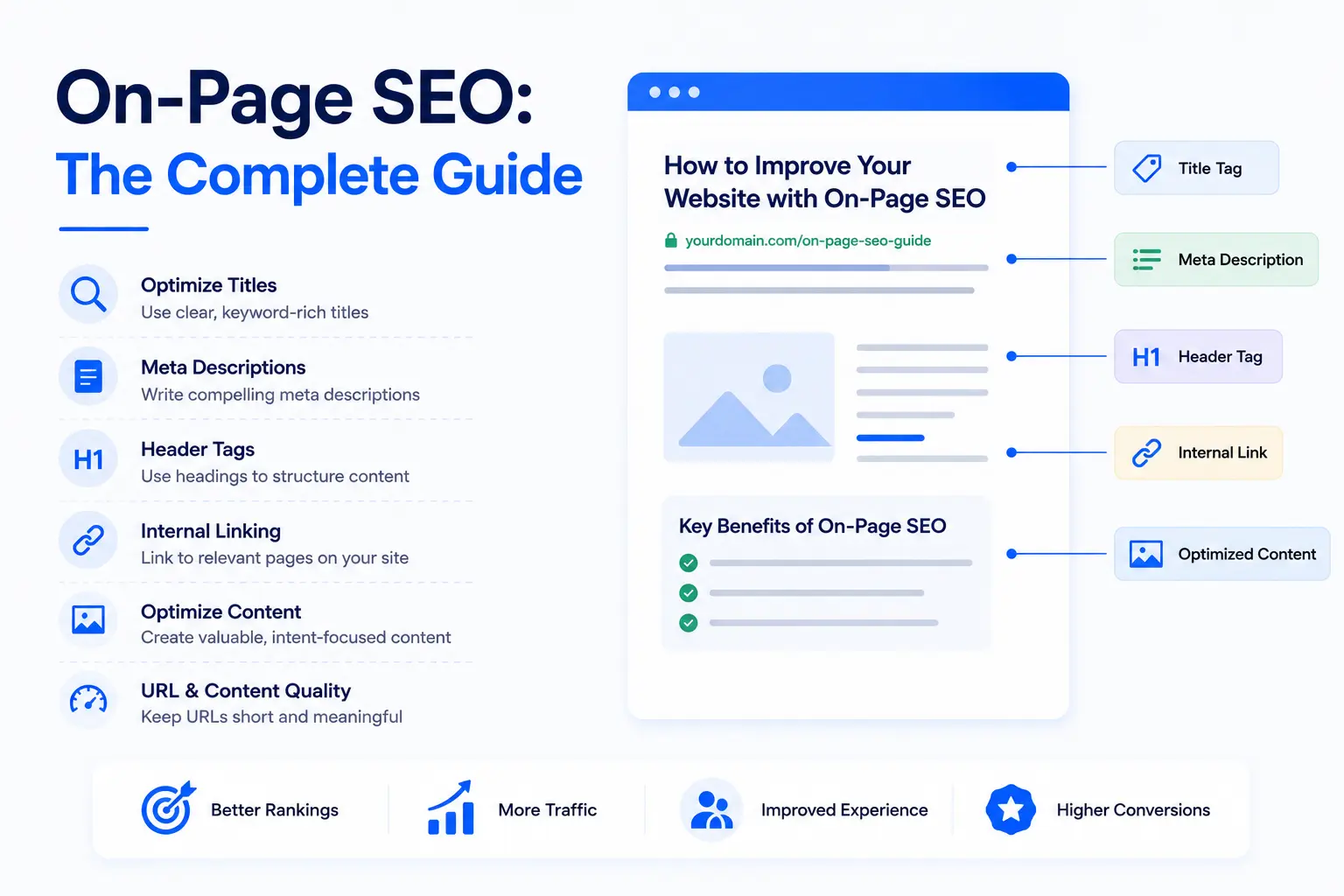
Your page is live, fully written, and packed with useful content. Still, Google keeps it buried on page 3. The problem is almost never your writing. It's your on-page SEO setup.
On-page SEO controls how search engines read, understand, and rank every page on your site. Fix it correctly and rankings follow. Skip it and even strong content gets ignored. This guide covers every on-page SEO factor that matters in 2026, including the AI search layer that most guides completely miss. Our team at A1 Technovation has applied this exact process across 150+ client sites, and the patterns are clear. Get these elements right and you stop leaving rankings on the table.
On-page SEO is the practice of optimizing the content and HTML elements on an individual web page so search engines can understand, index, and rank it for the right search queries.
Every change happens inside your own site. No outreach, no link building, no third-party platforms. You control it completely, which makes it the highest-leverage starting point in any SEO strategy.
A common source of confusion is how on-page SEO, off-page SEO, and technical SEO relate to each other. They serve different functions.
| Type | Scope | Examples | Your Control |
|---|---|---|---|
| On-Page SEO | Individual page level | Title tags, headers, content, internal links, schema | Full |
| Off-Page SEO | External signals | Backlinks, brand mentions, reviews | Partial |
| Technical SEO | Site-wide infrastructure | Crawl budget, site speed, robots.txt, Core Web Vitals | Full |
One more term to clarify: "on-site SEO" and "on-page SEO" are often used interchangeably, but they carry different scopes. On-page refers to a single page. On-site refers to site-wide patterns like navigation structure, breadcrumbs, and XML sitemaps. Both matter. If you need the broader foundation first, start with our What Is SEO guide. This guide focuses on the page level.
In 2026, on-page SEO extends beyond traditional HTML elements. Google's AI Overviews and answer engines like ChatGPT and Perplexity now retrieve content at the passage level. On-page SEO now requires formatting pages so AI systems can extract and cite them directly.
The On-Page SEO Framework: 5 Layers
Every on-page SEO decision fits into one of five layers. Understanding the framework first makes every section of this guide easier to apply.
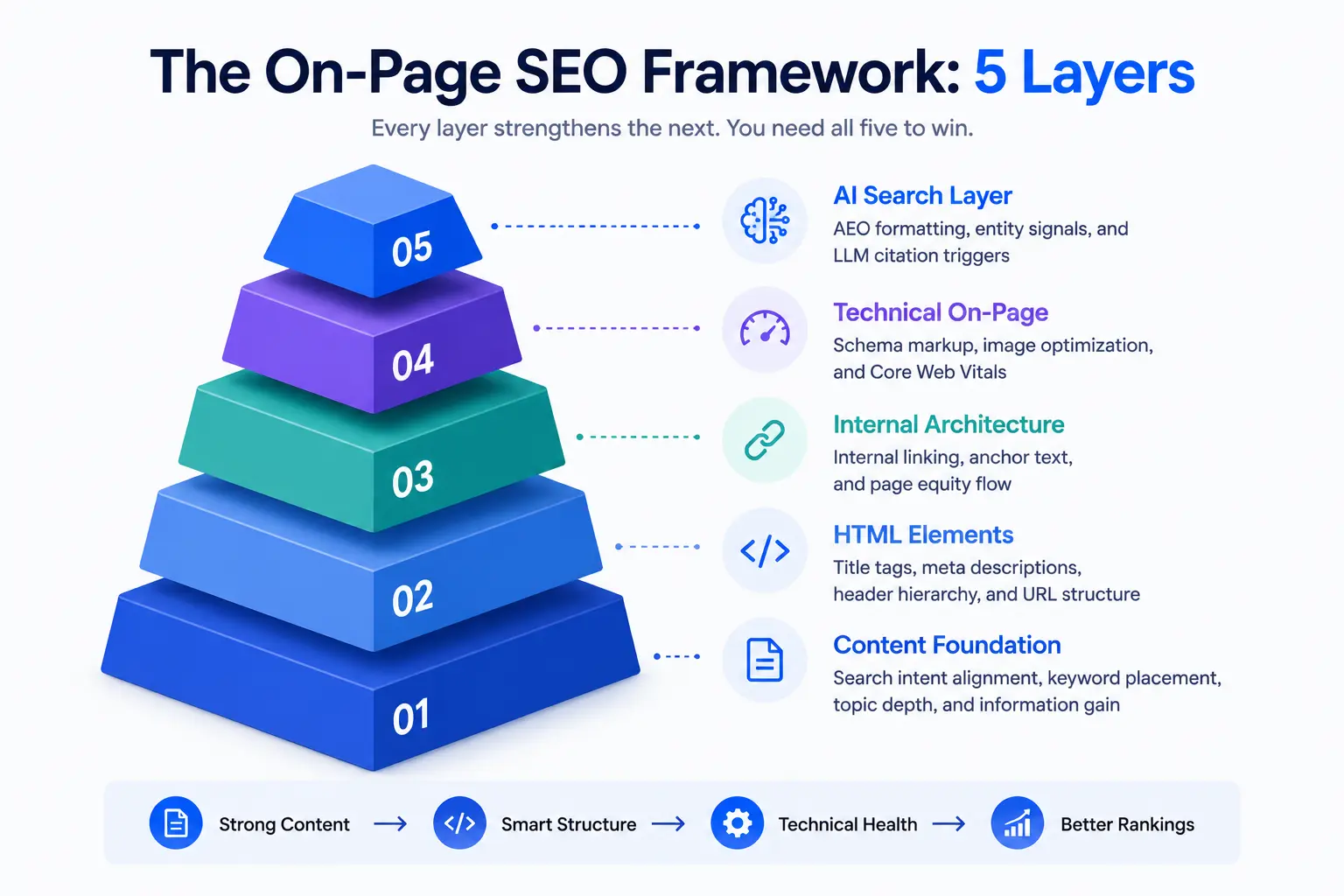
- Content Foundation: Search intent alignment, keyword placement, topic depth, and information gain
- HTML Elements: Title tags, meta descriptions, header hierarchy, and URL structure
- Internal Architecture: Internal linking, anchor text, and page equity flow
- Technical On-Page: Schema markup, image optimization, and Core Web Vitals
- AI Search Layer: AEO formatting, entity signals, and LLM citation triggers
Each layer builds on the one before it. A technically perfect page with weak content still loses. A content-rich page with broken technical signals still underperforms. You need all five.
Layer 1: Content Foundation
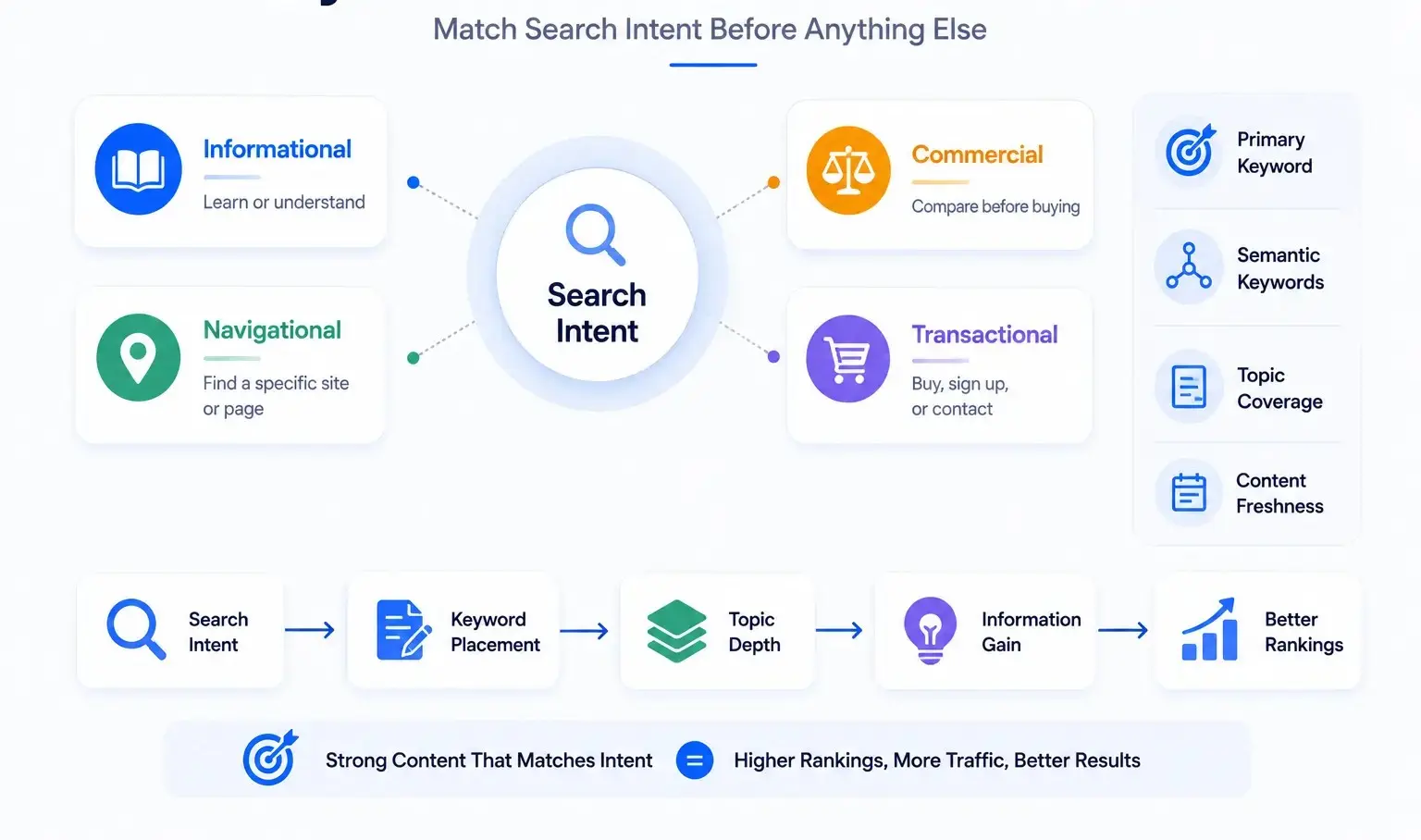
Match Search Intent Before Anything Else
Google ranks pages that answer what a searcher actually wants, not just pages that contain the right keywords. That intent sits behind every query, and it falls into four types.
| Intent Type | User Goal | Best Content Format |
|---|---|---|
| Informational | Learn or understand | Guides, how-tos, explanations |
| Navigational | Find a specific site or page | Brand pages, login pages |
| Commercial | Compare before buying | Comparison pages, reviews |
| Transactional | Buy, sign up, or contact | Service pages, product pages, landing pages |
The fastest way to confirm intent is to search your target keyword and read the top 5 results. Google already sorted them. If the top results are all comparison articles, Google tells you the reader wants a comparison. If they are all step-by-step guides, write a step-by-step guide. Your format must match what Google already rewards for that query.
A mistake we see constantly with new clients: they write a 3,000-word guide targeting a transactional keyword. Google never ranks it because searchers at that query stage want a service page, not an education piece.
Keyword Placement That Actually Works
Keyword placement signals to Google what your page is about and builds the initial relevance case. The rules are simple, but the execution is often off.
Place your primary keyword:
- In the first 100 words of the page body
- In the H1 tag
- In at least one H2 heading
- In the title tag, as close to the front as possible
- In the meta description at least once
- In the URL slug
Beyond these placements, distribute the keyword naturally throughout the body. No counting. If you write the content properly for the topic, the keyword appears at a natural frequency automatically.
Semantic keywords matter as much as the primary term. Google's Hummingbird and BERT algorithms understand topic relationships, not just exact words. A page about "on-page SEO" that never mentions "title tags," "meta descriptions," or "internal links" looks thin to Google even if the primary keyword appears 20 times. Cover the topic's related entities and terms and the keyword density takes care of itself. Our SEO content writing guide goes deeper on entity coverage and content structure.
Avoid keyword stuffing. Forcing exact-match repetitions hurts readability, triggers Panda-related quality signals, and rarely improves rankings in 2026.

Topic Depth and Information Gain
Google's Helpful Content system evaluates whether a page adds something that competing pages do not. This is the information gain principle. Publishing a page that says the same things as the top 10 results in a slightly different order gives Google no reason to rank yours.
To pass the information gain test, ask one question before publishing: does this page contain at least one piece of information, data point, example, or explanation that the current top results do not? If yes, publish. If no, either add that information or reconsider whether the page is ready.
Practical ways to add information gain:
- Include a real client example or case outcome with specific numbers
- Add a comparison table that does not exist elsewhere
- Cover a frequently asked question that the top results skip
- Add a current-year data point from a primary source
- Include a proprietary checklist or framework
Topic depth also means entity coverage. A thorough page on on-page SEO should mention title tags, meta descriptions, H1 tags, keyword placement, internal linking, schema markup, image optimization, Core Web Vitals, and the AI search layer. A page that skips schema markup entirely has a coverage gap. Google's entity-based understanding of content means gaps in entity coverage equal missed relevance signals.
Content freshness triggers. Set a reminder to review any page when:
- Its ranking drops more than 5 positions
- Its click-through rate drops more than 20%
- A key statistic, tool, or platform it references has changed
- Google updates an algorithm that relates to the page's topic
- Six months pass without a review
Layer 2: HTML Elements
Title Tags
The title tag is the single strongest HTML relevance signal for an individual page. Google uses it to understand the page's primary topic and displays it as the clickable headline in search results.
Optimal length: 50 to 60 characters. Google truncates titles beyond roughly 600px display width, which maps to around 60 characters. Keep the primary keyword before character 30 wherever possible.
The proven formula: Primary Keyword + Modifier + Brand (when space allows)
Before and after:
| Version | Title | Character Count | Problem |
|---|---|---|---|
| Before | "SEO Tips and How to Improve Your Website Rankings Today" | 56 | No keyword front-loading, vague |
| After | "On-Page SEO: The Complete Guide (2026 Checklist)" | 50 | Keyword first, specific, format signal |
Before and after (service page):
| Version | Title | Problem |
|---|---|---|
| Before | "Welcome to Our Digital Marketing Agency in Dhaka" | Brand-first, no keyword signal |
| After | "SEO Agency in Dhaka | A1 Technovation" | Keyword first, location specified |
Google rewrites title tags when they are too long, stuffed with keywords, or misaligned with the page content. To minimize rewrites: match the title closely to the H1, avoid clickbait or misleading phrasing, and keep it under 60 characters.
Meta Descriptions
Meta descriptions are not a direct ranking factor. They do not change your position in the SERP on their own. Their job is click-through rate, and CTR is a downstream ranking signal.
A strong meta description convinces the right searcher to click your result over the 9 others on the page.
Optimal length: 120 to 155 characters. Mobile search truncates earlier, around 105 to 120 characters. Write the most important value statement in the first 110 characters.
Formula: Problem the reader has + Solution this page provides + Action verb CTA
Before and after:
| Version | Meta Description |
|---|---|
| Before | "Read our blog post about on-page SEO and learn how to improve your website." |
| After | "On-page SEO controls how Google reads every page you publish. This guide covers 20+ factors, a full checklist, and the AI search layer most guides skip." |
In 2026, AI search interfaces pull opening paragraph text and meta descriptions to generate summaries. A tightly written meta description that matches the page's first paragraph increases your chance of being represented accurately in AI-generated answers. This becomes even more important when you are aligning on-page work with a broader SEO strategy.
Header Tag Hierarchy
Headers structure your page for both readers and search engines. Google uses heading tags to understand the topic map of your content. AI retrieval systems use headers as chunk boundaries, meaning each H2 section is treated as a discrete passage.
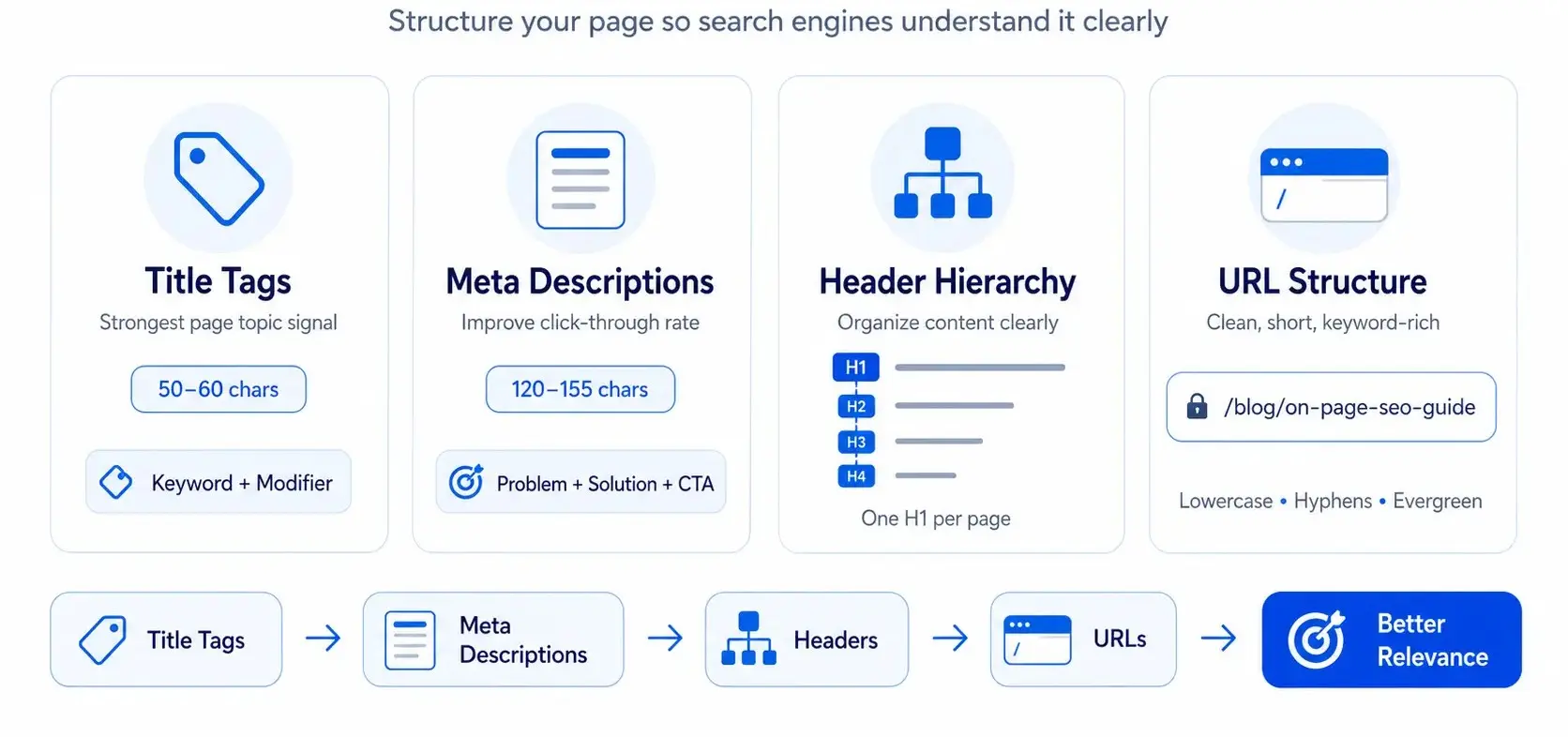
The rules:
- One H1 per page, always. It contains the primary keyword.
- H2 tags mark major topic sections. Each H2 should cover one distinct sub-topic.
- H3 tags support each H2 with more specific points.
- H4 tags add further depth under H3 sections when needed.
Common mistakes:
- Skipping from H2 directly to H4 (breaks document structure)
- Using bold text instead of headers (invisible to crawlers as structure signals)
- Writing keyword-free headers like "Introduction" or "Summary"
- Using headers purely for visual formatting rather than semantic structure
Every header should communicate what the section covers. "Title Tag Length" is a strong H3. "More Details" is not.
URL Structure
Clean URLs reinforce page relevance and improve click-through rate from search results. They also carry over more easily when pages get shared or linked.
URL best practices:
- Lowercase letters only
- Hyphens between words, never underscores
- Primary keyword included
- No dates for evergreen content (dating a URL forces a refresh every year or a redirect)
- Short: 3 to 5 words in the slug is the target
Examples:
| Type | URL | Assessment |
|---|---|---|
| Bad | /blog/?p=1042 |
No keyword, no meaning |
| Bad | /blog/2024/03/15/on-page-seo-complete-guide-for-beginners-2024 |
Too long, dated |
| Good | /blog/on-page-seo-guide |
Clean, keyword-inclusive, evergreen |
Canonical tags resolve duplicate content problems. Use a canonical tag when the same content exists at multiple URLs (for example, a page accessible with and without trailing slash, or a filtered product page). The canonical points to the preferred version and consolidates ranking signals there.
Layer 3: Internal Architecture
Internal Linking Strategy
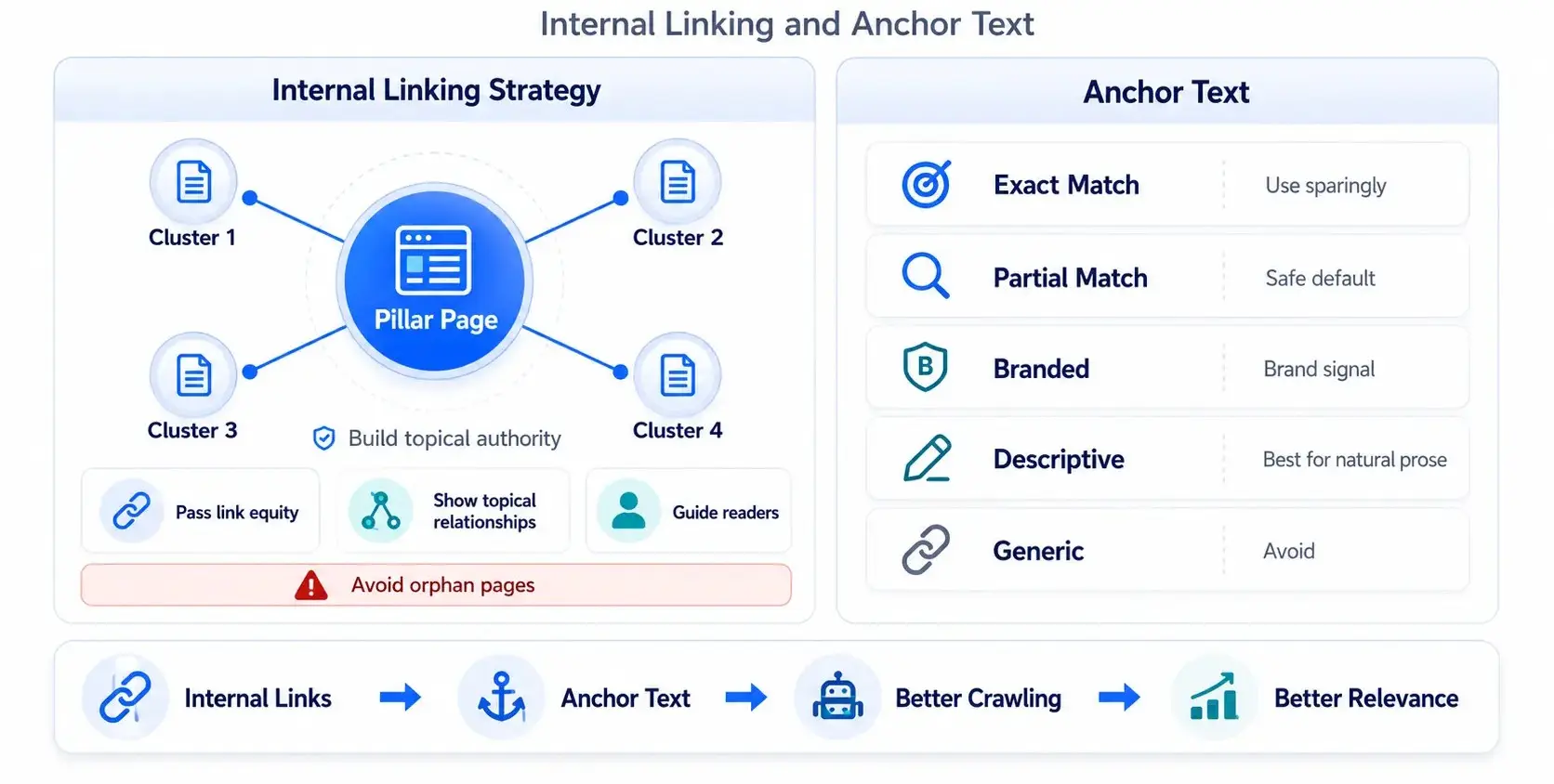
Internal links connect pages within your site and serve three jobs simultaneously: they pass link equity between pages, they help Google understand topical relationships, and they guide readers toward related content.
Minimum internal links per page:
- Blog posts: 2 to 3 links out, plus at least 1 link in from another indexed page
- Pillar pages: 5 to 10 links to cluster content
- Service pages: 2 to 4 links to relevant blog posts and case studies
Google's Reasonable Surfer patent assigns more weight to links placed prominently in the body copy compared to footer links or sidebar links. Links at the top of a page, in the first two paragraphs, carry stronger signals than links buried at the bottom.
Architecture patterns:
- Hub-and-spoke structures work best for topical authority building. The pillar page is the hub. Cluster pages are the spokes. Every cluster page links back to the pillar, and the pillar links out to every cluster. This creates a closed equity loop and signals comprehensive topical coverage.
- Silos are stricter: content in one topic category never links to another. They work for large e-commerce sites where topic separation is important, but for most content sites, hub-and-spoke with selective cross-cluster bridges outperforms strict silos.
Avoid orphan pages. An orphan page has no internal links pointing to it. Google crawls sites by following links. An orphan page gets crawled rarely, ranks weakly, and accumulates no equity from the rest of the site. If you want the full crawl and indexation side of this, see our technical SEO guide.
Anchor Text
Anchor text tells Google and readers what the linked page is about. It is a direct relevance signal for the destination page.
| Anchor Text Type | Example | Use Case | Risk |
|---|---|---|---|
| Exact match | "on-page SEO" | Use sparingly, 1 to 2 times max per site | Over-optimization if overdone |
| Partial match | "on-page optimization techniques" | Safe default, use frequently | Low |
| Branded | "A1 Technovation's SEO checklist" | Navigation and brand signals | Low |
| Descriptive | "this complete guide to on-page SEO" | Natural prose, high-trust | Very low |
| Generic | "click here" / "learn more" | Avoid entirely | Passes no topical signal |
A natural anchor text profile is roughly 50% semantic or descriptive, 30% branded or generic, and 20% partial or exact match. Sites with 80%+ exact-match anchors attract manual review flags.
Layer 4: Technical On-Page
Schema Markup and Structured Data
Schema markup is machine-readable code you add to a page so search engines understand its content structure precisely. It uses JSON-LD format and lives in the page's head section or inline in the body.
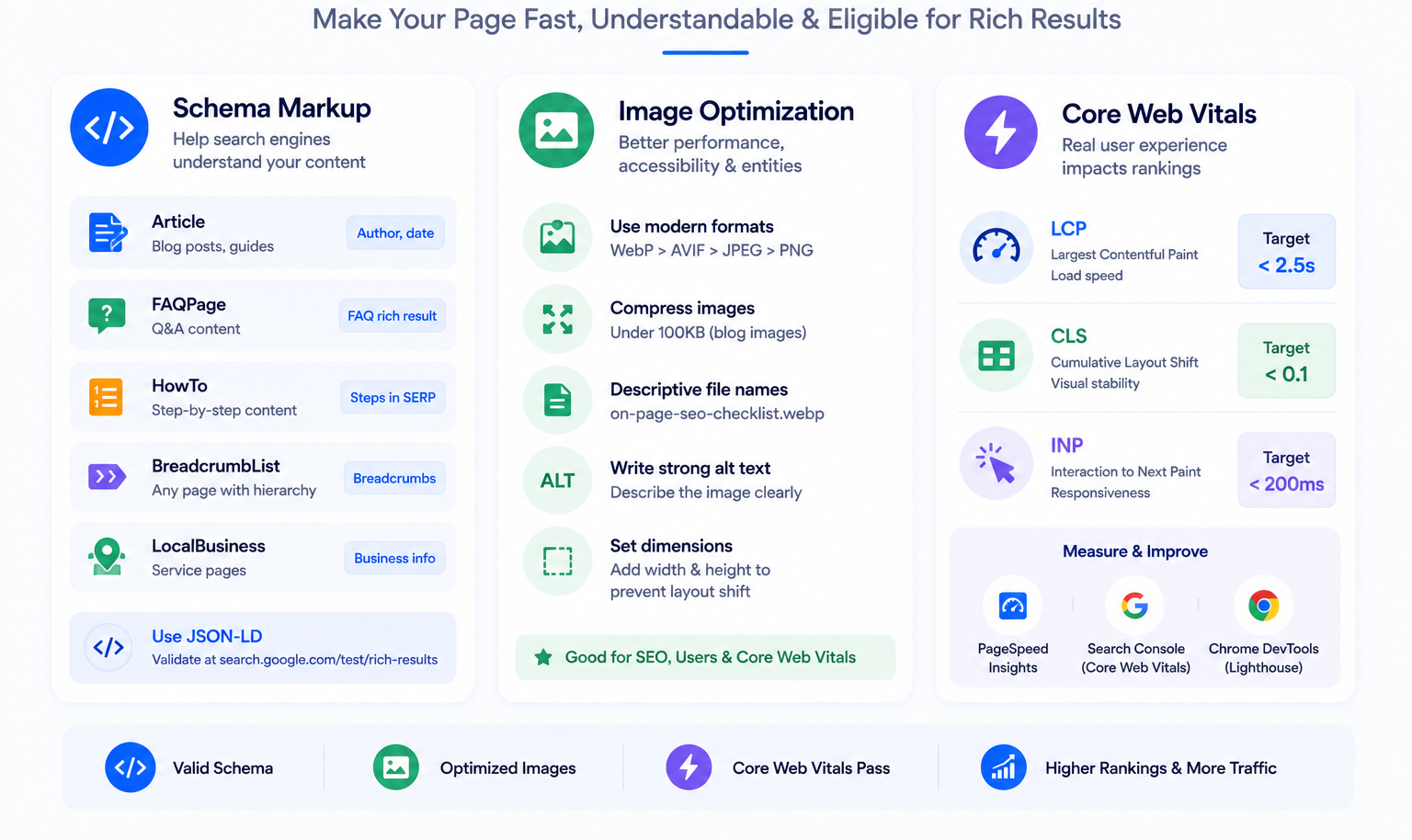
Schema does not directly improve rankings. It improves your eligibility for rich results, which increase click-through rate, and it dramatically lowers the cost for AI systems to extract and cite your content accurately.
The most valuable schema types for content sites:
| Schema Type | Best For | Rich Result |
|---|---|---|
| Article | Blog posts, guides | Author byline, date in SERP |
| FAQPage | Pages with Q&A sections | Expandable FAQ below result |
| HowTo | Step-by-step content | Numbered steps in SERP |
| BreadcrumbList | Any page with hierarchy | Breadcrumb path in SERP |
| LocalBusiness | Service area pages | Business info panel |
Always use JSON-LD over microdata or RDFa. Google recommends JSON-LD and it is easier to implement, validate, and maintain.
After adding schema, validate it using Google's Rich Results Test. A valid schema block does not guarantee a rich result, but an invalid one guarantees you never get one.
Example Article + FAQPage stack:
{
  "@context": "https://schema.org",
  "@graph": [
    {
      "@type": "Article",
      "headline": "On-Page SEO: The Complete Guide",
      "author": {
        "@type": "Person",
        "name": "Likhon Ahmed",
        "url": "https://a1technovation.com/about"
      },
      "publisher": {
        "@type": "Organization",
        "name": "A1 Technovation",
        "url": "https://a1technovation.com"
      },
      "datePublished": "2026-06-01",
      "dateModified": "2026-06-01"
    },
    {
      "@type": "FAQPage",
      "mainEntity": [
        {
          "@type": "Question",
          "name": "What is on-page SEO?",
          "acceptedAnswer": {
            "@type": "Answer",
            "text": "On-page SEO is the practice of optimizing content and HTML elements on a web page so search engines can understand, index, and rank it for relevant queries."
          }
        }
      ]
    }
  ]
}
Image Optimization
Images affect page performance, accessibility, and entity signals simultaneously. Each one either helps your SEO or adds friction to it.
Format priority:
- WebP: Best balance of quality and file size. Supported by all modern browsers.
- AVIF: Smaller than WebP but slower to encode. Good for large galleries.
- JPEG: Fallback for older browsers only.
- PNG: Reserve for images requiring transparency.
Compression target: Under 100KB per image for blog content. Hero images can reach 150KB with careful compression. Tools like Squoosh or ShortPixel handle this before upload.
File naming: Name files descriptively before uploading. on-page-seo-checklist.webp helps. IMG_20260601_003.webp does nothing.
Alt text as entity declaration: Alt text serves two purposes. It makes images accessible for screen readers, and it declares an entity relationship to search engines. Treat alt text as a precise, descriptive sentence.
- Strong alt text: On-page SEO checklist showing title tags, headers, internal links, schema markup, and Core Web Vitals score
- Weak alt text: SEO checklist image
- Stuffed alt text (avoid): on-page SEO on-page SEO checklist 2026 on-page SEO guide
Set image dimensions (width and height attributes) in the HTML. This prevents layout shift as the page loads, directly reducing your Cumulative Layout Shift score.
Core Web Vitals
Core Web Vitals are Google's page experience signals. They measure three things: load speed, visual stability, and input responsiveness. Pages that fail these thresholds lose ranking ground to pages that pass them, everything else being equal.
The three signals:
- LCP (Largest Contentful Paint): Measures how long the largest visible element takes to render. Target: under 2.5 seconds. The largest element is usually the hero image or the H1 text block. Optimize it by compressing images, using a CDN, and preloading the hero image.
- CLS (Cumulative Layout Shift): Measures visual stability. A layout that jumps around as it loads frustrates users and hurts engagement. Target: under 0.1. Fix it by setting width and height on images and videos, avoiding dynamically injected content above existing content, and reserving space for ads and embeds.
- INP (Interaction to Next Paint): Replaced FID in 2024. Measures how fast the page responds after a user interaction. Target: under 200ms. Optimize by reducing JavaScript execution time and avoiding long tasks on the main thread.
Tools to measure Core Web Vitals:
- Google PageSpeed Insights:
pagespeed.web.dev - Google Search Console: Core Web Vitals report (field data from real users)
- Chrome DevTools: Lighthouse panel for lab data
Fix LCP and CLS first. They have the largest direct impact on rankings and user experience.
Layer 5: The AI Search Layer
This is the layer that separates 2026 on-page SEO from everything published before it. Google's AI Overviews now appear on the majority of queries in major markets. ChatGPT, Perplexity, and Gemini route significant research and commercial traffic. Being present in these systems requires deliberate passage engineering, not just good content.
On-Page SEO for AI Overviews
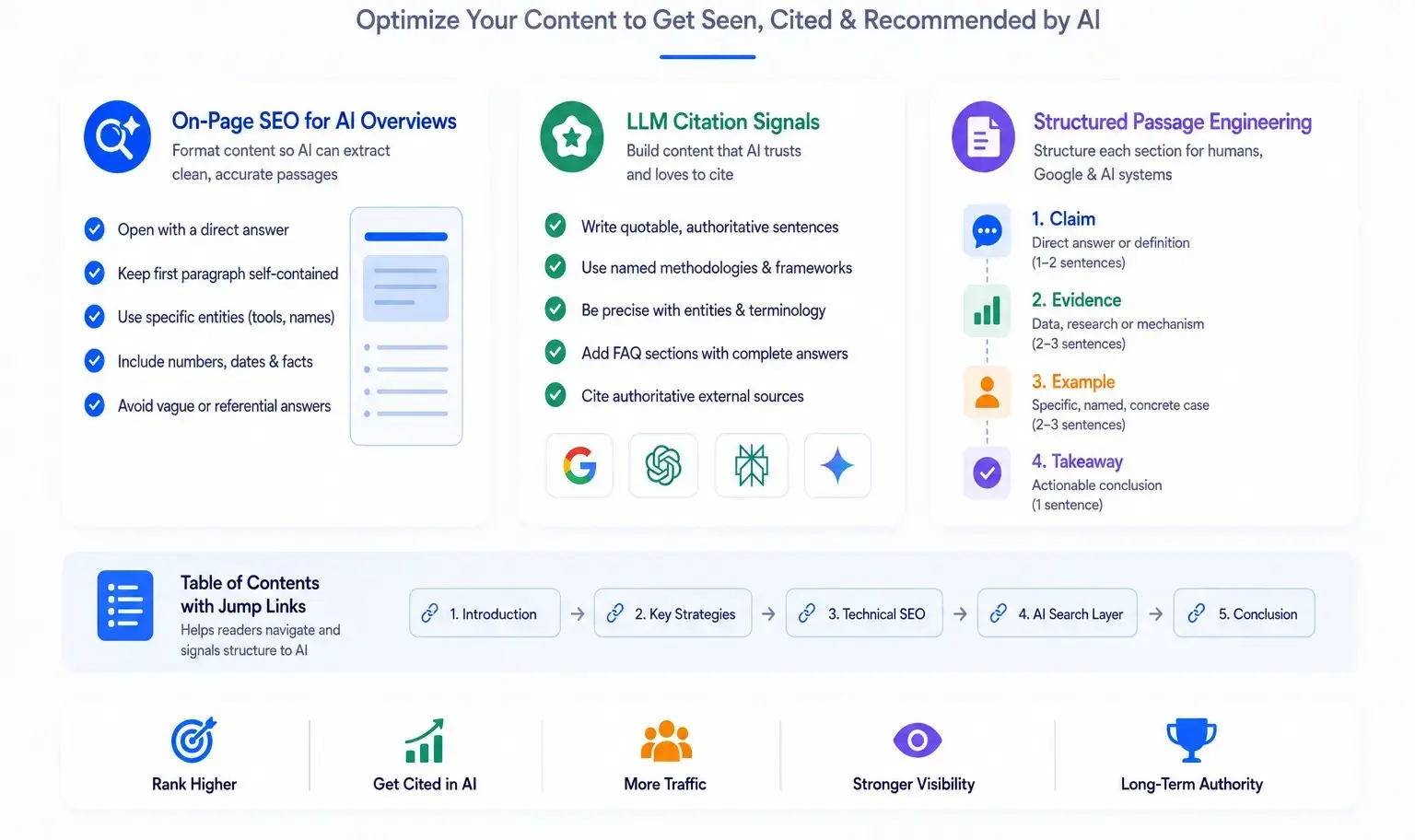
Google's AI Overviews pull content from pages already ranking in the top 10. The first qualification is to rank. The second qualification is to be formatted in a way that AI systems can extract clean, accurate passages. If you want the dedicated overview of answer-engine formatting, read our AEO explainer.
AI retrieval works at the passage level, not the page level. Each H2 section is evaluated as a standalone chunk. A passage that requires context from a previous section to make sense is a weak citation target. A passage that answers a sub-query completely on its own is a strong citation target.
The Section Writing Formula (AEO)
To optimize each H2 section for AI retrieval:
- Open with a direct definition or answer in the first two sentences
- Keep the first paragraph self-contained (under 100 words, complete thought)
- Use specific named entities (say "Google Search Console," not "the tool")
- Include numbers, dates, and measurable facts where they exist
- Avoid starting answers with pronouns that reference previous sections ("This means..." without context)
LLM Citation Signals
ChatGPT, Perplexity, and Gemini retrieve content through different signals, but several patterns work across all three.
Quotable sentences increase citation frequency. A quotable sentence is an authoritative, standalone statement that delivers a complete idea. The sentence "On-page SEO is the highest-leverage SEO layer because every optimization happens on your own site, independent of backlinks or domain authority" is citable. "On-page SEO is important" is not.
Named methodology creates citation anchors. When a process or framework carries a specific name, for example, "A1 Technovation's 5-Layer On-Page SEO Framework." AI systems can attribute it directly. Unnamed generic advice blends into the background.
Entity precision throughout the article signals reliability. Name every tool, algorithm, schema type, and concept precisely. Vague language reduces an AI system's confidence in your content as a citation source.
FAQ sections with complete answers are the highest-ROI AEO asset on any page. Each question and answer pair is a structured chunk that AI systems can extract with near-zero processing overhead. Eight well-written FAQ pairs on a pillar page create eight independent citation opportunities.
External citations to authoritative sources (Wikipedia, Google Search Central, schema.org) act as entity grounding signals. They tell AI retrieval systems that your content operates in a verified information context.
Structured Passage Engineering
Every section of a well-optimized page follows this internal structure:
- Claim: Direct answer or definition (1 to 2 sentences)
- Evidence: Data, research, or specific mechanism (2 to 3 sentences)
- Example: Specific, named, concrete case (2 to 3 sentences)
- Takeaway: Actionable conclusion (1 sentence)
This four-part structure works for every H2 and H3 section. It makes content scannable for humans, structured for Google, and extractable for AI systems.
Add a Table of Contents with jump links at the top of any page over 2,000 words. Jump links signal document structure to AI retrieval systems and improve time-on-page by helping readers navigate directly to their answer.
The On-Page SEO Checklist
This checklist covers all five layers. Use it before publishing any page and during content audits.
Content Foundation
HTML Elements
Internal Architecture
Technical On-Page
AI Search Layer
Common On-Page SEO Mistakes and How to Fix Them
These are the eight most frequent issues our team finds during client site audits. Each one has a clear fix.
| Mistake | Impact | Fix |
|---|---|---|
| Keyword-free H1 | Google loses the primary relevance signal | Rewrite to include primary keyword |
| Title tag over 60 characters | Truncated in SERP, loses keyword visibility | Cut to 55 to 58 characters, keyword front-loaded |
| Generic anchor text ("click here") | No topical signal passed to destination page | Replace with descriptive partial-match anchors |
| Missing schema markup | Ineligible for rich results, harder for AI to cite | Add Article + FAQ + Breadcrumb schema stack |
| Duplicate meta descriptions | Signals low-quality content at site level | Write unique meta for every page |
| No inbound internal links (orphan pages) | Page not crawled regularly, no equity flow | Add 2 to 3 links from related indexed pages |
| Uncompressed images over 300KB | High LCP, poor Core Web Vitals score | Convert to WebP, compress below 100KB |
| No AEO formatting | Zero eligibility for AI Overview citations | Restructure sections to open with direct answers |
The most common mistake across all 150+ sites we have audited is the missing or weak H1 tag. Many WordPress themes auto-generate H1 tags from the page title with no keyword consideration. Fixing the H1 alone has moved pages from position 8 to position 3 on targeted queries within 3 to 4 weeks of recrawling.
On-Page SEO vs Off-Page SEO vs Technical SEO
Each type of SEO addresses a different question Google asks about your site.
- On-page SEO answers: Is this page relevant to this query?
- Off-page SEO answers: Does the web trust this page?
- Technical SEO answers: Can Google find, crawl, and render this page efficiently?
All three questions must be answered. A page that is relevant but not trusted will not beat a trusted competitor. A page that is trusted but not crawlable will not rank at all.
The correct sequence for a new or recovering site:
- Fix technical SEO first. A page Google cannot crawl cannot benefit from on-page work.
- Build strong on-page signals. Relevance must be clear before off-page efforts compound it.
- Build off-page authority through links and brand signals. This amplifies the on-page foundation.
We see agencies skip step 2 and invest heavily in links to pages with weak on-page setups. The links send equity but the page cannot convert it into rankings because the relevance case is incomplete.
On-page SEO is the prerequisite.
Frequently Asked Questions
What is on-page SEO?
On-page SEO is the practice of optimizing content and HTML elements on an individual web page so search engines can understand, index, and rank it for relevant queries. It covers title tags, meta descriptions, header structure, keyword placement, internal links, schema markup, image optimization, Core Web Vitals, and AI search formatting.
What is the difference between on-page SEO and off-page SEO?
On-page SEO covers everything you optimize directly on your own pages: content, HTML tags, internal links, and technical factors. Off-page SEO covers external signals like backlinks, brand mentions, and social signals. Both matter, but on-page SEO is the prerequisite. Building links to a page with poor on-page signals produces weak results.
How long should a title tag be?
Keep title tags between 50 and 60 characters. Google truncates titles beyond approximately 600 pixels of display width, which typically cuts at around 60 characters. Place the primary keyword in the first 30 characters wherever possible.
Does meta description affect Google rankings?
Meta descriptions are not a direct ranking factor. Their impact is on click-through rate. A well-written meta description increases the number of people who click your result over competitors on the same SERP page, and CTR patterns influence Google's quality signals over time.
How many internal links should a blog post have?
A typical blog post should have at least 2 to 3 outbound internal links to related content and at least 1 inbound internal link from another indexed page. Pillar pages should have 5 to 10 links pointing to their cluster content. Orphan pages with zero inbound internal links rank weakly regardless of content quality.
What schema markup should I use for a blog post?
Use Article schema as the base. Stack FAQPage schema for your FAQ section and BreadcrumbList for your site hierarchy. This three-schema combination covers the most valuable rich result types for informational content and provides strong entity signals for AI retrieval systems.
How does on-page SEO affect AI Overviews?
Google's AI Overviews pull content from pages already ranking in the top 10. To qualify, your page must first rank. Once ranking, passage-level formatting increases citation likelihood: direct answers at the top of each section, self-contained H2 chunks, FAQ blocks with complete answers, and precise named entities throughout.
How long does on-page SEO take to show results?
On-page changes on already-indexed pages typically reflect in rankings within 2 to 6 weeks after Google recrawls the page. Pages with strong on-page improvements on domains with healthy crawl budgets can see movement within 7 to 14 days. New pages with no historical data take longer, typically 2 to 3 months before meaningful ranking signals develop.
Connect on-page work to the rest of the system
These supporting guides cover the technical layer, content execution, and authority signals that reinforce on-page SEO.
Get a Free On-Page SEO Audit
A weak on-page setup is a leak. Traffic passes by, rankings stall, and AI engines skip you when generating answers because your pages are not formatted for citation.
Our team at A1 Technovation audits your site's on-page SEO across all five layers. We identify the specific gaps holding your pages back and give you a prioritized fix list.