Most small businesses know they need SEO. Very few know where to actually start, or what to skip.
This guide skips the theory and gives you the priority sequence.
SEO for small businesses is the process of making your website visible in Google Search and AI-powered answers so customers find you before they find a competitor. Done right, it generates organic traffic that compounds over time without paying for every click.
At A1 Technovation, we have built SEO strategies for 150+ small businesses across retail, professional services, e-commerce, and SaaS. We have seen which starting points produce rankings in three months and which ones waste a full year. This guide reflects that field experience.
Use this as your starting point. Go deeper on each section as your confidence and budget grow.
The 3 Layers of Small Business SEO
Every small business SEO strategy sits on three layers. All three run together, but they follow a priority sequence. Get the foundation right before adding layers on top.
- Layer 1: Foundation. Google Search Console, Google Analytics 4, and a technically clean website. No rankings happen reliably without this.
- Layer 2: Visibility. Keyword targeting, on-page optimization, and a Google Business Profile. This is where organic traffic begins.
- Layer 3: Authority. Content strategy, backlinks, and AI search visibility. This is where rankings compound.
Most guides jump straight to Layer 2 or 3. The businesses that see the fastest results start at Layer 1 every time. If you want the broader foundation first, read our What Is SEO guide before working through this sequence.
Step 1: Set Up Your SEO Foundation
Your SEO foundation consists of three free Google tools that every small business needs connected before any other work begins.
Shows indexed pages, search queries, crawl errors, and Core Web Vitals — the single most important free SEO tool.
Shows what visitors do after arrival — engagement, conversions, and exit points.
Verify the site is crawlable, mobile-friendly, and loads fast enough to compete.
Set Up Google Search Console
Google Search Console is the single most important SEO tool a small business can use. It shows exactly which pages Google has indexed, which search queries bring visitors to your site, crawl errors that block indexation, and Core Web Vitals performance. If you have not installed it yet, follow our step-by-step Google Search Console setup guide first.
- Go to search.google.com/search-console.
- Sign in with a Google account and click Add property.
- Enter your domain and select Domain property.
- Verify ownership through your DNS provider by adding a TXT record.
- Submit your XML sitemap under Indexing to Sitemaps.
Connect Google Analytics 4
Google Analytics 4 shows you what visitors do after they arrive. GSC tells you how they found you; GA4 tells you whether they stayed, converted, or left immediately.
Audit Your Technical Baseline
Use PageSpeed Insights, mobile usability checks, and your GSC indexing report to verify the site is crawlable, usable, and fast enough to compete. For the full implementation list, use our technical SEO checklist as your audit worksheet.
Step 2: Do Keyword Research Built for Small Business Budgets
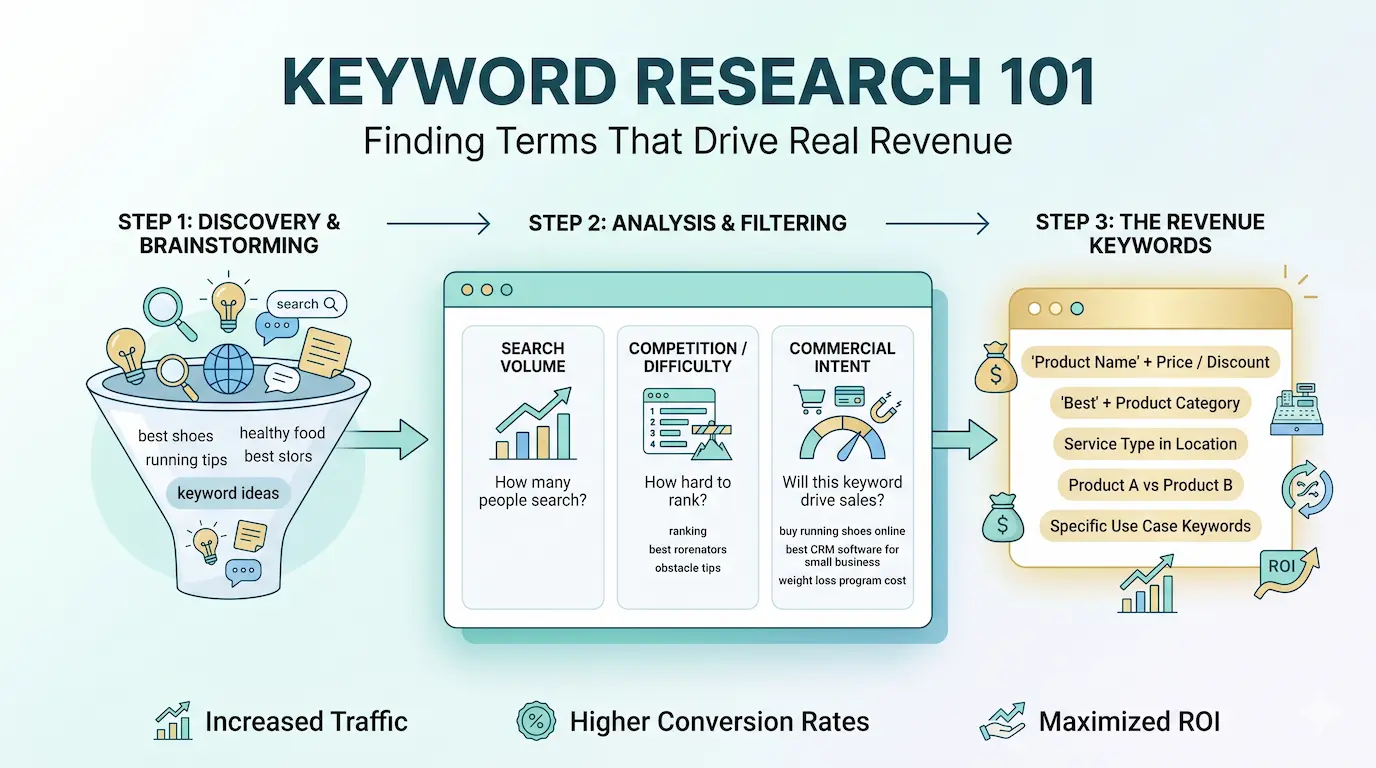
Large companies fight for head terms. Small businesses win by targeting specific, lower-competition queries where intent is clearer and competition is lower.
The Long-Tail Advantage
Long-tail keywords give small businesses three advantages: lower competition, higher purchase intent, and easier ranking with less content investment.
Tools for Small Business Keyword Research
- Google Search for autocomplete, People Also Ask, and related searches.
- Google Keyword Planner for search volume and local filtering.
- Ahrefs Webmaster Tools for current keyword visibility and site crawl insights.
- Semrush Free Plan for light competitor keyword research.
Build a Keyword List by Intent
| Intent | Examples | Priority |
|---|---|---|
| Transactional | SEO agency Dhaka, hire SEO expert Bangladesh | Highest |
| Commercial | best SEO tools for small business, SEO vs PPC comparison | High |
| Informational | how does SEO work, what is a backlink | Medium |

Step 3: Optimize Your Website's On-Page SEO
The five on-page elements that move rankings most for small businesses are title tags, H1s, body content, internal links, and image alt text.
Title Tags and Meta Descriptions
Keep title tags under 60 characters, place the primary keyword near the start, and make the meta description read like a strong ad.
H1 Heading
Every page needs one H1 that reflects the page intent naturally and clearly.
Body Content with Natural Keyword Placement
Place the primary keyword naturally in the first 100 words, use related terms across the page, and match the depth top-ranking pages already provide.
Internal Links
Add two to five internal links on every new page you publish, especially from blog posts to important service pages.
Image Alt Text
Write factual, descriptive alt text that helps both accessibility and search engines understand the image context.
Step 4: Claim and Optimize Your Google Business Profile
For any small business with a physical location or service area, Google Business Profile is the most important SEO asset outside the website itself.
Pro tip: Businesses with complete Google Business Profiles get 7× more clicks than those with incomplete profiles. Fill every field — including services, products, and Q&A.
Complete Your Profile Fully
Fill in your exact business name, most relevant categories, service areas, hours, phone number, and the best landing page URL.
Build Reviews Systematically
Review recency and velocity influence local pack rankings. Ask consistently and respond to every review.
Post Regularly
Share offers, updates, case studies, and new content once or twice a week to keep the profile fresh.
Step 5: Build a Content Strategy That Ranks and Gets Cited
Content is how small businesses build topical authority and become citable sources for Google AI Overviews, ChatGPT, and Perplexity.
Your main service page
FAQ / How-to
Comparison
Case Study
Local Guide
Beginner Guide
The Topic Cluster Model
Build one pillar page around your main service, then support it with five to ten cluster articles answering specific related questions.
Write for Answer Engine Optimization
Open each section with a direct 40 to 60 word answer, then expand with supporting context. This helps both snippets and AI citation systems. For the dedicated AI-search layer, pair this with our guides on AEO and GEO.
Add FAQ Sections to Every Guide
FAQ sections make answers easier to extract and support FAQ schema markup for stronger machine readability.
Set a Sustainable Publishing Cadence
One strong article per week beats several weak AI-generated posts. Publish consistently and update older content as your archive grows.
Step 6: Build Backlinks Without a Big Budget
Small businesses usually do not need hundreds of backlinks. Five to twenty relevant local or niche links can move the needle meaningfully.

Local Citation Building
Keep your name, address, and phone number consistent across Google Business Profile, Bing Places, Yelp, Apple Maps, and niche directories.
Guest Articles on Local and Industry Sites
Pitch focused article ideas to local publishers and industry blogs instead of sending generic outreach.
Earn Links Through Original Data
Case studies, local market observations, and survey findings can naturally attract links over time.
Step 7: Optimize for AI Search: The Small Business Advantage
Small businesses can often get cited in AI answers before they fully rank for the same query in traditional organic results.

AI Search fact: ChatGPT, Perplexity, and Google AI Overviews collectively influence millions of buying decisions. Structuring your content for citation gives you a head start competitors won't expect.
Structure Content as Self-Contained Passages
Each H2 section should work as a standalone answer a reader or AI system can understand in isolation.
Implement Organization Schema
Add organization schema to help AI systems verify who you are, what you do, and where your business can be confirmed across the web.
Add AI Bot Permissions to Your robots.txt
User-agent: GPTBot
Allow: /

User-agent: PerplexityBot
Allow: /

User-agent: ClaudeBot
Allow: /
SEO Timeline for Small Businesses: Realistic Expectations
SEO for small businesses typically shows first measurable results in 3 to 6 months. Meaningful traffic and lead growth often appear between months 6 and 12, with full ROI arriving in 12 to 18 months.
SEO Budget Guide for Small Businesses (2026)
Most small businesses fit into one of three stages: DIY plus tools, tools plus freelancer support, or a full agency engagement.
Stage 1: DIY + Tools ($50 to $150/month)
Best for businesses with available time and a smaller starting budget.
Stage 2: Tools + Freelancer Support ($300 to $800/month)
Best for established sites that need direction plus implementation support.
Stage 3: Full Agency SEO ($800 to $2,000+/month)
Best for businesses ready to scale faster and compete seriously in their market.
Small Business SEO Mistakes to Avoid
- Targeting keywords that are too broad. Start with specific city and service combinations.
- Publishing content without a linking strategy. Support every page with internal links.
- Setting up GBP and ignoring it. Treat it as an ongoing weekly asset.
- Expecting results in 30 days. SEO compounds over months, not days.
- Confusing AI-generated content with high-value SEO content. Original insight and specificity still matter.

Frequently Asked Questions About SEO for Small Businesses
SEO for Small Businesses: The Core Definition
SEO for small businesses is the process of optimizing a website to appear in Google Search results and AI-powered answers when potential customers search for the products or services the business offers.
Can a Small Business Do SEO Without Hiring an Agency?
Yes. Most small businesses can handle the basics themselves, but the tradeoff is time, speed, and technical depth.
Small Business SEO Costs: A Realistic Breakdown
DIY generally starts at $50 to $150 per month, mixed support at $300 to $800, and full agency SEO from $800 to $2,000+.
SEO Results Timeline: Months 1 Through 18
Most businesses see early movement in three to six months, stronger growth between six and twelve months, and fuller ROI over twelve to eighteen months.

Likhon leads SEO strategy at A1 Technovation, where he has helped 150+ small businesses build organic traffic and ranking authority. He specializes in technical SEO, content strategy, and AI search optimization.
View full profileBuild the next layer after the small-business basics
These articles deepen the foundation around local visibility, technical health, and long-term organic growth for smaller teams.
Start Your Small Business SEO With A1 Technovation
You now have the core sequence. If you want expert help implementing the technical, content, local, and AI-search layers together, A1 Technovation can help.
Request a Free SEO Consultation →