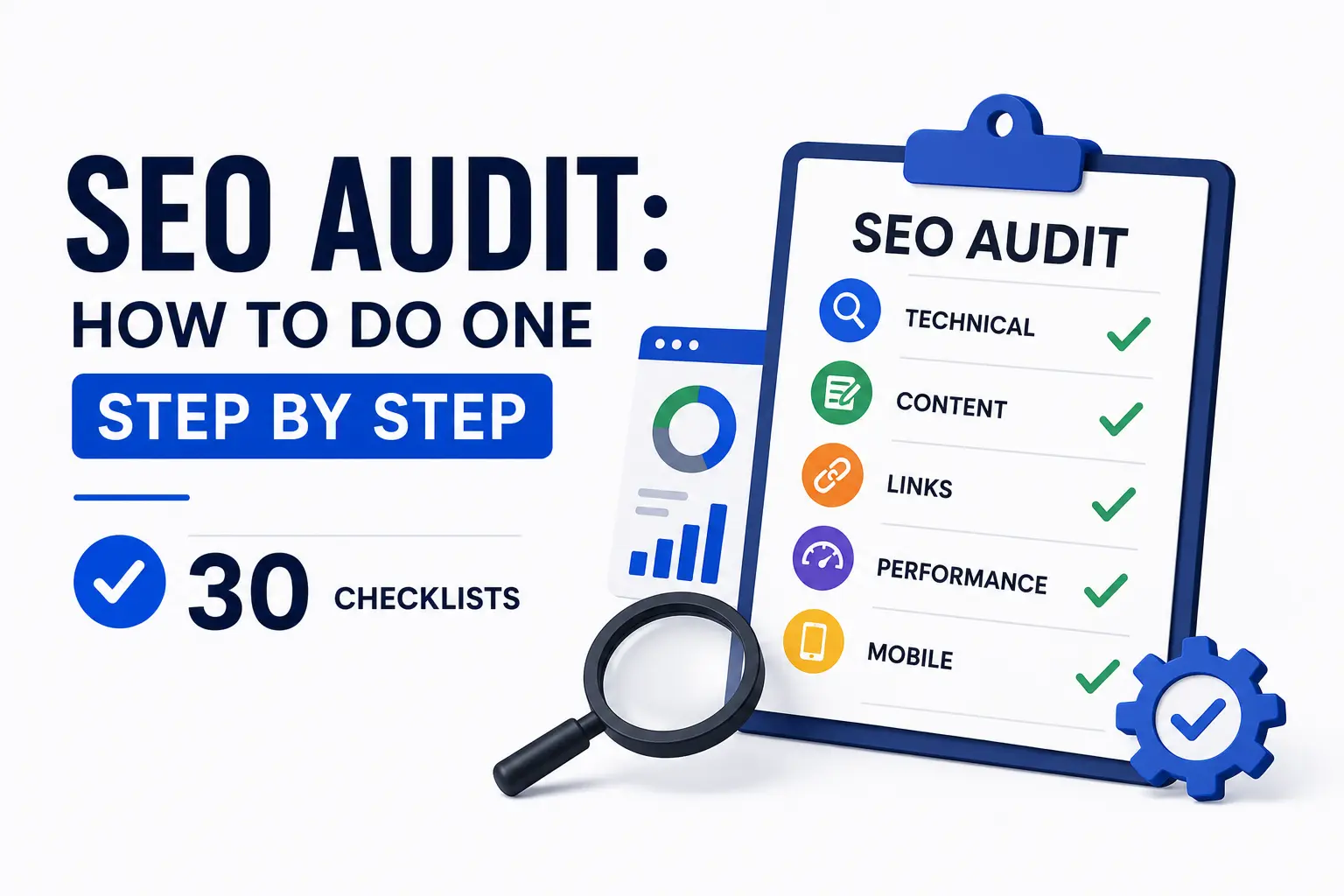
An SEO audit is a structured review of a website's technical health, on-page optimization, content quality, backlink profile, and AI search visibility. It identifies the exact issues preventing pages from ranking on Google or getting cited by AI engines like ChatGPT and Perplexity. A complete SEO audit covers six phases and 30 checks. This guide walks through every single one.
Most websites have a ranking problem they cannot see. Traffic has flatlined or dropped. Pages that should rank on page one sit on page three. The usual response is to write more content or build more links. Both waste time if the real problem is a misconfigured robots.txt file, a sitewide noindex tag, or content that fails a basic search intent check.
We have run SEO audits for 150+ clients across the US, UAE, Saudi Arabia, Qatar, and Bahrain since 2018. The same six-phase process catches problems that tool dashboards miss, and the same 30 checklists produce a prioritized fix list you can execute in a single sprint.
Only 33% of websites pass basic SEO checks. The other 67% have critical issues silently blocking rankings and AI visibility. This guide covers every layer.
Before You Start: Your Audit Priority Matrix
Run this matrix against every finding from the 30 checklists. Fix in order.
| Priority Level | Fix Timeline | Examples |
|---|---|---|
| Critical | Within 24 hours | Noindex on live pages, blocked robots.txt, 404 on top landing pages |
| High | Within 1 week | Missing canonical tags, LCP over 4s, zero schema on key pages |
| Medium | Within 30 days | Thin content, missing FAQs, orphan pages with no internal links |
| Low | Within 90 days | Minor anchor text issues, alt text gaps, small redirect chains |
Tools You Need Before Starting Your SEO Audit
A proper SEO audit requires the right tools at each phase. Trying to audit without them produces incomplete data and missed issues.
Free Tools That Cover the Core Audit Areas
- Google Search Console - index coverage, performance data, Core Web Vitals, manual actions
- Google Analytics 4 (GA4) - traffic baseline, engagement rate, landing page performance
- Google PageSpeed Insights - LCP, INP, CLS scores and specific fix recommendations
- Screaming Frog SEO Spider (free up to 500 URLs) - full site crawl, title tags, meta, H-tags, response codes, images
Paid Tools Worth the Investment
- Ahrefs or Semrush - keyword rankings, backlink profile, competitor analysis, site audit
- Sitebulb - advanced crawl visualization, crawl depth maps, issue prioritization
| Tool | Primary Use | Cost |
|---|---|---|
| Google Search Console | Index coverage, performance, Core Web Vitals | Free |
| Google Analytics 4 | Traffic baseline, engagement | Free |
| PageSpeed Insights | Speed and Core Web Vitals | Free |
| Screaming Frog | Full site crawl (up to 500 URLs) | Free / $259/yr |
| Ahrefs | Backlinks, rankings, keywords | From $129/mo |
| Semrush | Site audit, backlinks, rankings | From $140/mo |
| Sitebulb | Advanced crawl visualization | From $14/mo |
Checklist 1-5: Technical SEO Audit
Technical SEO covers the foundation of your site's search visibility. No content update or link-building effort produces results if crawlers cannot reach, render, and index your pages properly. If you need a broader primer before auditing, our technical SEO guide explains the full infrastructure layer in more depth.
Run your Screaming Frog crawl first and keep it open throughout the technical phase. Every checklist in this section pulls data from that crawl plus Google Search Console.
Checklist 1: Crawlability Check
Crawlability determines whether search engine bots can access your pages in the first place. A misconfigured robots.txt file is one of the most common and most damaging technical SEO errors we find on client sites.
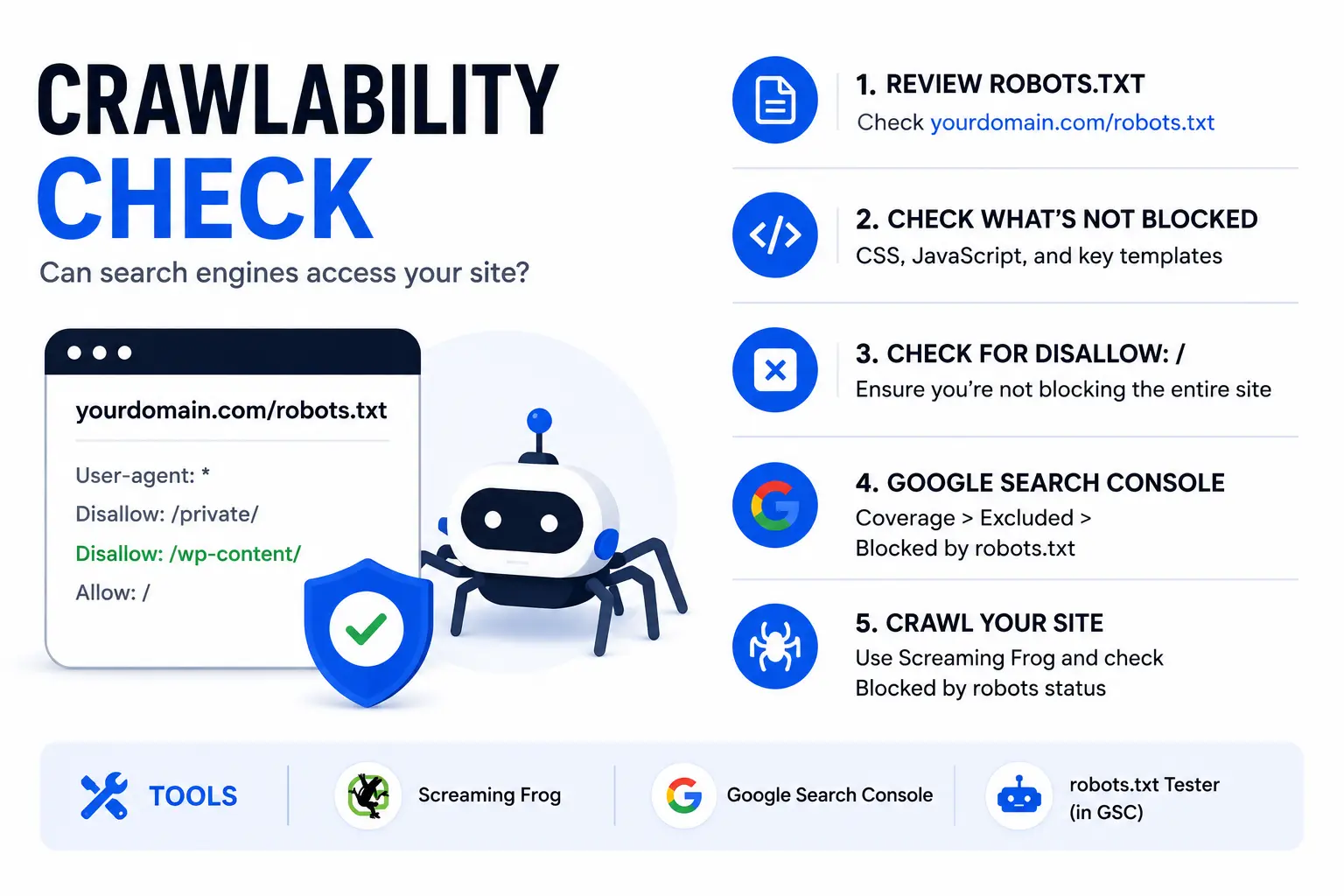
Run these checks:
- Open your robots.txt file at yourdomain.com/robots.txt and review every Disallow rule
- Confirm the file does not block CSS, JavaScript, or key page templates
- Check for
Disallow: /which blocks the entire site from all crawlers - In Google Search Console, go to Coverage > Excluded > Blocked by robots.txt and review every URL listed
- Use Screaming Frog to crawl your site and filter for pages returning a Blocked by robots status
Common mistake to fix: Developers frequently push a staging robots.txt file (which blocks all crawlers) to the production server on launch day. This has happened to multiple clients we have audited. One e-commerce client had their entire site blocked for 11 days after a redesign. Check this immediately after any site relaunch, and compare your directives against Google's robots.txt guidance if anything looks unclear.
Tools: Screaming Frog, Google Search Console Coverage Report, robots.txt URL tester in GSC
Priority: Critical
Checklist 2: Indexability and Index Coverage
A page can be crawlable but still excluded from Google's index. The Index Coverage report in Google Search Console separates these two states clearly.
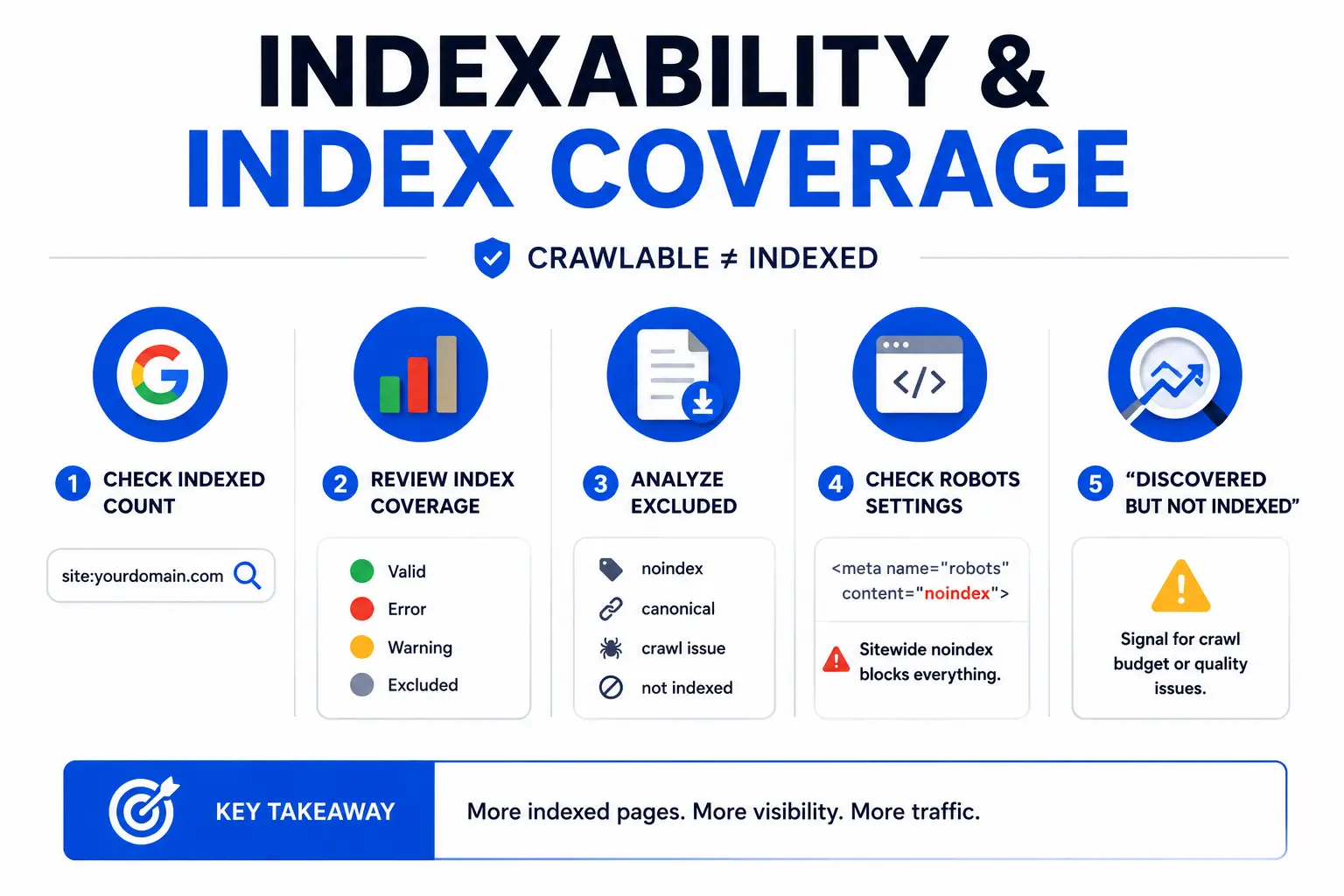
Run these checks:
- Run
site:yourdomain.comin Google to get a rough count of indexed pages - In Google Search Console, go to Index > Pages and review the four categories: Valid, Error, Warning, Excluded
- Export the Excluded pages list and categorize by reason: noindex tag, canonical to a different URL, crawl anomaly, or found but not indexed
- Check your CMS templates for sitewide meta robots settings. A noindex tag accidentally applied at the theme level blocks every page on the site from ranking
- Flag any large cluster of "Discovered but not indexed" URLs as a potential crawl budget or content quality issue
Experience note: In Q1 2024, we audited a SaaS client whose developer had toggled a noindex meta tag in the WordPress SEO plugin settings during a test. The setting stayed on after go-live. All 340 pages were excluded from Google's index for 6 weeks before the client noticed traffic had dropped to near zero. The fix took 3 minutes. The recovery took 8 weeks.
Tools: Google Search Console Index > Pages, Screaming Frog, Ahrefs Site Audit
Priority: Critical
Checklist 3: XML Sitemap Audit
An XML sitemap tells Google which pages exist and helps prioritize crawl budget toward your most important content. A poorly maintained sitemap actively misleads crawlers.
Run these checks:
- Confirm your XML sitemap exists at yourdomain.com/sitemap.xml
- In Google Search Console, go to Sitemaps and verify your sitemap is submitted and being processed without errors
- Open the sitemap and check that it includes only indexable, live pages
- Remove from the sitemap: 301 redirect URLs, 404 pages, noindex pages, and pages with canonical tags pointing elsewhere
- Confirm your sitemap updates dynamically each time you publish or update a page
Common mistake: Many WordPress sites using Yoast or Rank Math generate sitemaps that include tag pages, author archive pages, and category pages with thin or near-duplicate content. Include only the pages you actively want Google to prioritize.
Tools: Google Search Console > Sitemaps, XML Sitemap Validator, Screaming Frog
Priority: High
Checklist 4: HTTPS and Security Check
Google treats HTTPS as a confirmed ranking signal. Mixed content (HTTP resources loaded on an HTTPS page) creates security warnings that can reduce user trust and crawl consistency.
Run these checks:
- Confirm all pages force HTTPS by testing a few key pages with the HTTP version of the URL
- Open Chrome DevTools on 5 key pages, go to the Console tab, and look for mixed content warnings
- Verify your SSL certificate is valid and not expiring within the next 30 days
- Check that your CDN (if you use one) serves all assets over HTTPS, including images, fonts, and scripts
- In Screaming Frog, filter for HTTP pages and HTTP resources on HTTPS pages
Common mistake: Images stored on a media server or third-party storage bucket that still uses HTTP create mixed content warnings even when the main domain uses HTTPS. This is especially common after migrating hosting providers.
Tools: Chrome DevTools Security tab, SSL Labs Server Test (ssllabs.com), Screaming Frog
Priority: High
Checklist 5: Redirect Audit
Redirect chains dilute PageRank, slow page load times, and confuse crawlers. Every unnecessary hop in a redirect chain reduces the link equity that flows to your final destination URL.
Run these checks:
- In Screaming Frog, go to Response Codes and filter for 3xx responses
- Identify redirect chains: any path that requires more than one redirect hop (A goes to B goes to C instead of A going directly to C)
- Identify redirect loops: A redirects to B, B redirects back to A
- Confirm that all HTTP, non-www, and trailing slash variants redirect directly to your canonical URL in a single hop
- Check that any URL consolidation from a redesign or migration routes through a direct 301 rather than through multiple legacy redirect steps
Common mistake: After website redesigns, old page URLs often redirect through two or three intermediate URLs before reaching the final destination. We have seen chains as long as five hops. Each hop costs PageRank and crawl budget. Flatten all chains to a single direct redirect.
Tools: Screaming Frog Response Codes > 3xx, Redirect Checker tools, Ahrefs Site Audit
Priority: High
Checklist 6-10: Core Web Vitals and Page Speed Audit
Core Web Vitals are Google's confirmed page experience ranking signals for 2026. They measure how fast pages load, how quickly they respond to user interaction, and how visually stable the layout is during load. They also connect directly to how search engines interpret page experience in our guide to how search engines work.
One important update applies to every audit guide published before March 2024: INP (Interaction to Next Paint) replaced FID (First Input Delay) as a Core Web Vitals metric. If your current SEO audit process still tracks FID, update it.
2026 Core Web Vitals Thresholds
| Metric | Good | Needs Improvement | Poor | Signal Measured |
|---|---|---|---|---|
| LCP | Under 2.5s | 2.5s to 4s | Over 4s | Largest content element load speed |
| INP | Under 200ms | 200ms to 500ms | Over 500ms | Interaction responsiveness |
| CLS | Under 0.1 | 0.1 to 0.25 | Over 0.25 | Visual layout stability |
Pages that reach the "Good" threshold across all three metrics gain a ranking advantage in competitive SERPs where content quality is otherwise equal.
Checklist 6: LCP (Largest Contentful Paint) Audit
LCP measures the time from page load start to when the largest visible element (usually a hero image or the H1 heading) fully renders on screen.
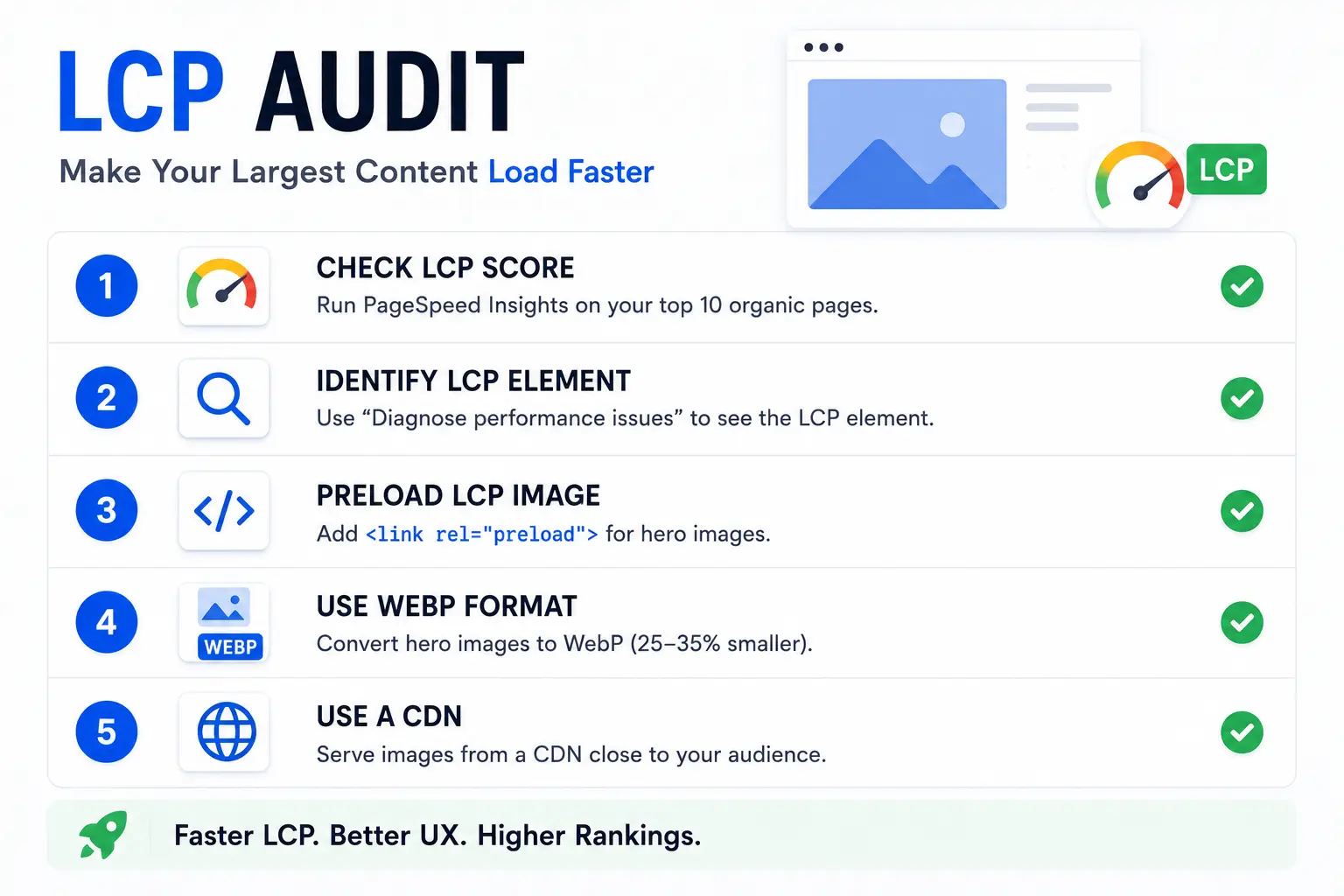
Run these checks:
- Run PageSpeed Insights on your top 10 organic landing pages and record the LCP score for each
- Identify the LCP element on each page: click "Diagnose performance issues" in PageSpeed Insights to see what Google identifies as the LCP element
- For hero images that are the LCP element, add a
<link rel="preload">tag so the browser starts loading that image immediately - Convert hero images from JPEG or PNG to WebP format. WebP produces 25-35% smaller files at equivalent quality
- Serve images through a CDN with a server location close to your primary audience
Tools: Google PageSpeed Insights, Chrome DevTools Performance panel, web.dev/vitals
Priority: High
Checklist 7: INP (Interaction to Next Paint) Audit
INP measures the delay between a user action (click, keypress, or tap) and the next visible update on screen. A high INP score means the page feels slow to respond to user input, which increases bounce rates and reduces engagement.
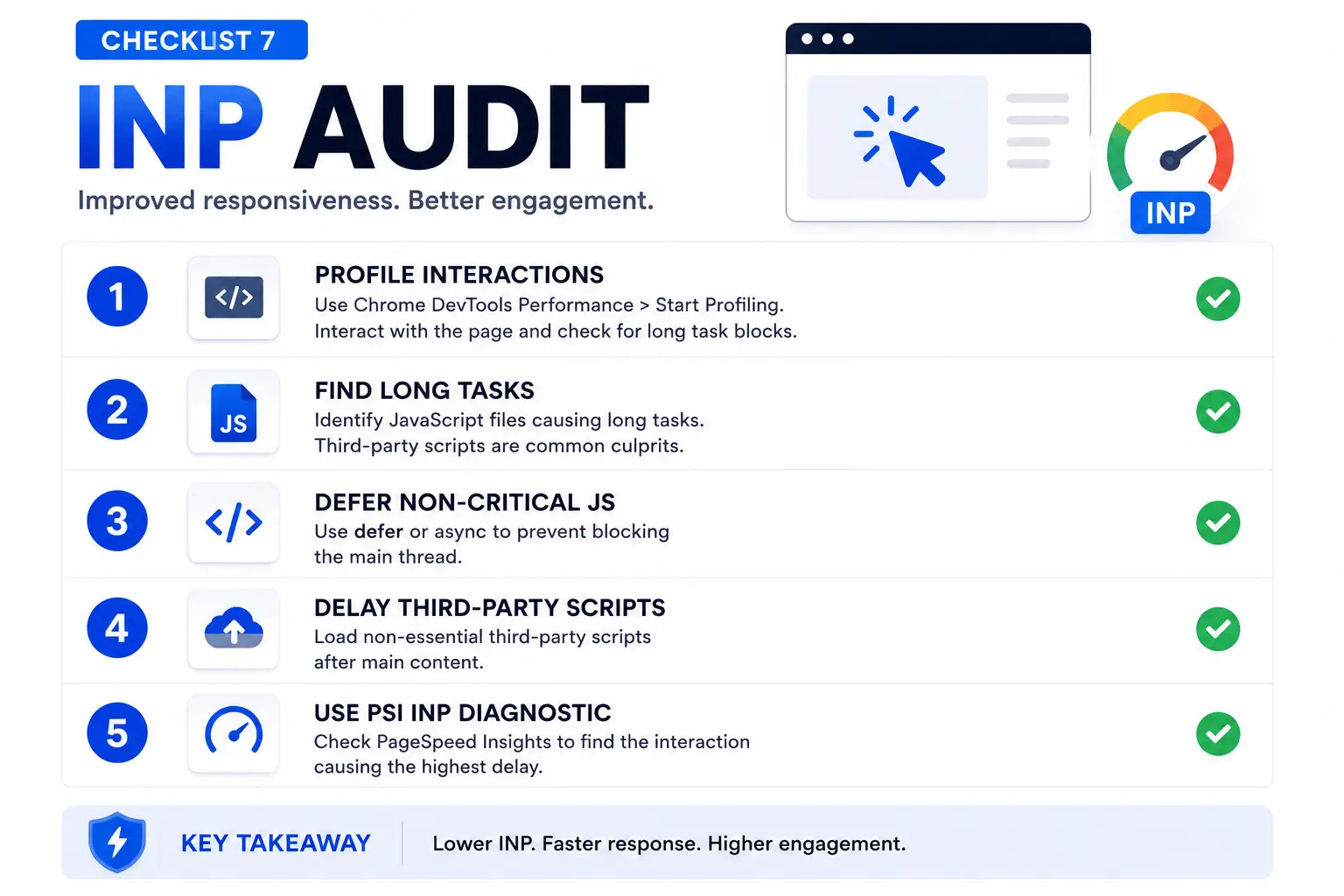
Run these checks:
- Open Chrome DevTools on key interactive pages, go to Performance > Start Profiling, interact with the page (click buttons, open menus), and stop profiling. Look for long task blocks in the timeline
- Check for JavaScript files that run large tasks on the main thread. Third-party scripts (chat widgets, analytics, ad scripts) are common culprits
- Defer non-critical JavaScript using the
deferorasyncattribute - Move non-essential third-party scripts to load after the main page content
- Use Chrome's INP diagnostic in PageSpeed Insights to identify the specific interaction causing the highest delay
Common issue: Live chat widgets, retargeting pixels, and embedded video players frequently cause INP scores above 500ms. Loading them after the main content renders eliminates the problem in most cases.
Tools: PageSpeed Insights, Chrome DevTools Performance, web.dev/inp
Priority: High
Checklist 8: CLS (Cumulative Layout Shift) Audit
CLS measures how much page elements shift around during loading. Ads loading late, images without defined dimensions, and late-loading fonts all cause layout shift and penalize the CLS score.
Run these checks:
- Run PageSpeed Insights and look for the CLS score and the specific elements identified as causing shift
- Add explicit
widthandheightattributes to every image in your HTML. Without them, the browser cannot reserve space before the image loads - Set
font-display: swapin your CSS for custom fonts to prevent invisible text during font loading - If you use display advertising, define a fixed container size for every ad slot so the page does not shift when the ad loads
- Test after every site update. Adding new images or changing templates frequently reintroduces CLS issues
Tools: PageSpeed Insights, Chrome DevTools Rendering > Layout Shift Regions, Screaming Frog
Priority: Medium
Checklist 9: Mobile Usability Audit
Google uses mobile-first indexing for all websites. Your site's mobile version is the version Google crawls, indexes, and ranks. A mobile usability problem directly reduces your search visibility.
Run these checks:
- Run Google's Mobile-Friendly Test on your homepage, top service pages, and top blog posts
- In Google Search Console, go to Experience > Mobile Usability and review all flagged issues
- Check for tap targets too close together (buttons or links that are hard to tap accurately on a touchscreen)
- Verify your viewport meta tag is set correctly:
<meta name="viewport" content="width=device-width, initial-scale=1"> - Check that text sizes are readable on mobile without pinching and zooming
Tools: Google Mobile-Friendly Test, Google Search Console > Mobile Usability, Chrome DevTools Device Mode
Priority: High
Checklist 10: Overall Page Speed Audit
Core Web Vitals measure specific signals, but overall page performance affects user experience and engagement metrics that Google tracks through Chrome user data. Pages with poor overall speed scores lose users before they read a single word.
Run these checks:
- Run PageSpeed Insights on your top 10 organic landing pages and record the mobile Performance score for each
- Flag any page scoring below 50 on mobile as Critical and below 70 as High priority
- Open the "Opportunities" section in PageSpeed Insights and work through the highest-impact recommendations first: eliminate render-blocking resources, compress images, enable browser caching, reduce unused CSS and JavaScript
- Test pages in both PageSpeed Insights and Google Search Console's Core Web Vitals report. The GSC report uses 28-day field data (real user measurements) while PageSpeed uses lab data
Tools: Google PageSpeed Insights, Google Search Console > Core Web Vitals, GTmetrix
Priority: High
Checklist 11-16: On-Page SEO Audit
On-page SEO covers the elements directly on each page that tell Google what the page is about and how it should rank. Technical SEO gets your pages into the index. On-page SEO determines which keywords they rank for and at what position. If you want a deeper walkthrough beyond this audit layer, see our full on-page SEO guide.
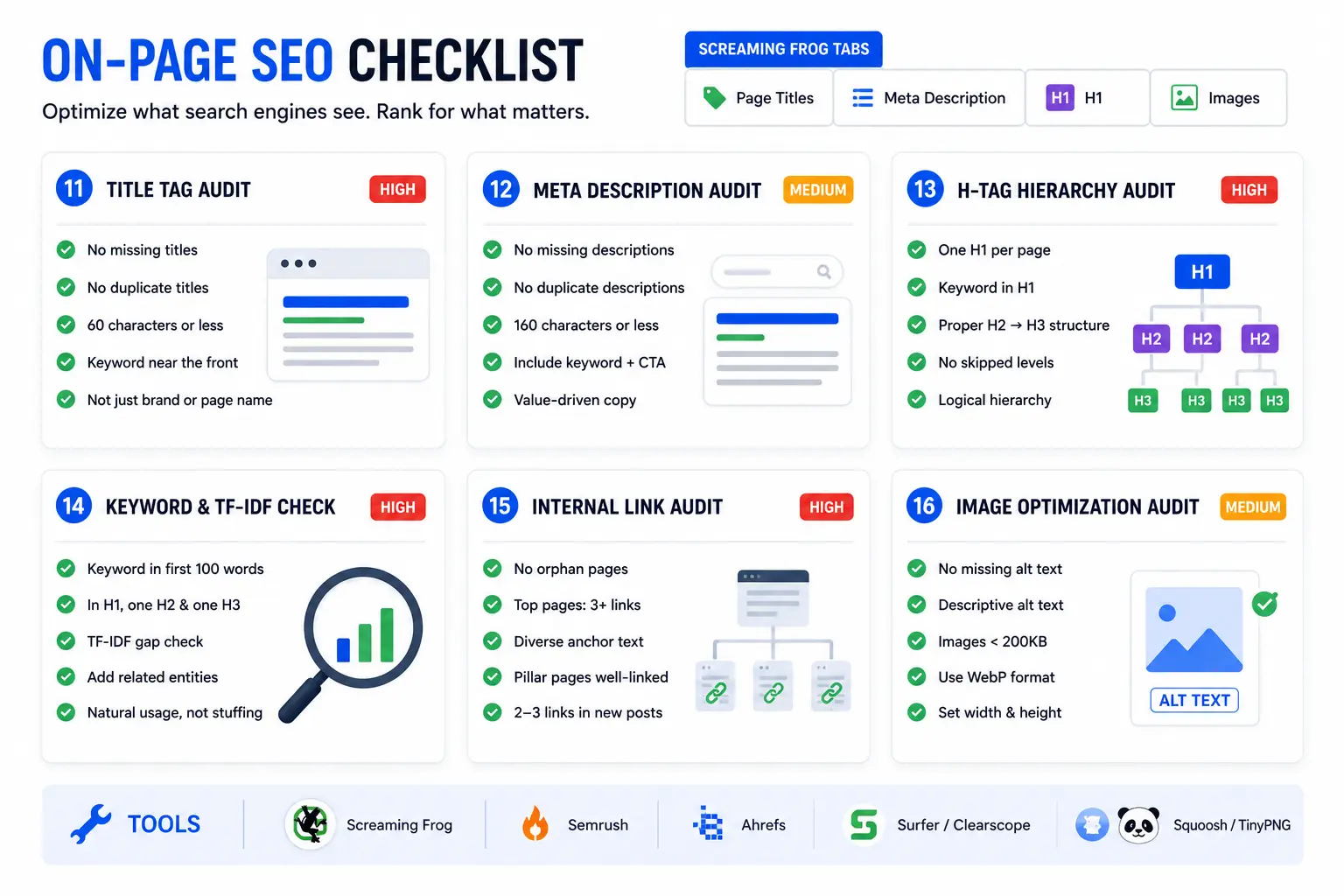
Run Screaming Frog with these tabs open as you work through each checklist: Page Titles, Meta Description, H1, Images.
Checklist 11: Title Tag Audit
The title tag is the single most influential on-page ranking signal. It appears in the browser tab, the Google search result, and social media previews when the page is shared.
Run these checks:
- In Screaming Frog, go to the Page Titles tab and export the full list
- Filter for missing titles (no title tag at all)
- Filter for duplicate titles (multiple pages sharing the same title)
- Filter for titles over 60 characters. Google typically truncates titles longer than 55-60 characters in search results, cutting off the end of your message
- For each flagged title, verify the primary keyword appears near the front of the tag, not buried at the end
- Flag titles that are just the page name or brand name with no keyword signal
Example fix: A service page with the title "Services - A1 Technovation" tells Google almost nothing about the page's topic. A title like "Technical SEO Services | A1 Technovation" puts the primary keyword first and the brand second, giving Google a clear topical signal.
Tools: Screaming Frog > Page Titles, Semrush Site Audit, Ahrefs Site Audit
Priority: High
Checklist 12: Meta Description Audit
Meta descriptions do not directly affect rankings. They directly affect click-through rate from the search results page. A strong meta description is the difference between a user clicking your result or the one below it.
Run these checks:
- In Screaming Frog, go to the Meta Description tab and export the full list
- Filter for missing meta descriptions. Google generates one automatically if you don't provide one, but the auto-generated version rarely matches the CTA-focused copy you would write yourself
- Filter for duplicates. Duplicate meta descriptions signal thin content or templated pages to Google
- Filter for descriptions over 160 characters. Google truncates longer descriptions with an ellipsis, cutting off your message mid-sentence
- Confirm each meta description includes the primary keyword, an active verb, and a clear value proposition
Template: [Result they get] + [how you deliver it] + [action CTA]. Under 160 chars.
Example: "Run a complete SEO audit with our 30-point checklist covering technical, on-page, content, backlink, and AI visibility. Step-by-step guide by A1 Technovation."
Tools: Screaming Frog > Meta Description, Semrush On-Page SEO Checker
Priority: Medium
Checklist 13: H-Tag Hierarchy Audit
A logical heading structure tells both users and search engines how a page is organized. Google uses heading tags to understand topic relationships within a page and to identify passages for featured snippets.
Run these checks:
- In Screaming Frog, go to H1 and filter for pages with zero H1 tags and pages with multiple H1 tags
- Confirm each page has exactly one H1 that includes the primary keyword and describes the page's main topic
- Check that H2s divide the main topic sections and H3s support each H2. Skipping levels (going from H1 directly to H3) breaks the semantic hierarchy
- In Screaming Frog, export the full H-tag structure and review 5-10 key pages manually to verify the hierarchy makes logical sense
- Flag H1 tags that match the title tag word-for-word on every page. They can be similar, but the H1 often works better as a reader-focused version of the page topic while the title tag is optimized for the SERP
Tools: Screaming Frog H1 tab, Chrome DevTools, Ahrefs Site Audit
Priority: High
Checklist 14: Keyword Placement and TF-IDF Check
Keyword placement tells Google the primary topic of a page. TF-IDF (Term Frequency - Inverse Document Frequency) analysis identifies the supporting terms and entity-rich vocabulary that top-ranking competitors use and that your page may be missing.
Run these checks:
- Confirm the primary keyword appears in the first 100 words of the page content
- Verify the primary keyword appears in the H1, at least one H2, and at least one H3
- Run a TF-IDF comparison against the top 5 ranking pages for your primary keyword. Identify every term they use frequently that your page does not include
- Add entity-rich supporting terms naturally. If competitors consistently mention "Google Search Console," "crawl budget," and "index coverage" in their SEO audit content and your page doesn't, that gap reduces your topical completeness score
- Avoid stuffing. TF-IDF guides vocabulary, not repetition count
Tools: Surfer SEO, Clearscope, or manual review of top 5 ranking pages with Ctrl+F term frequency counting
Priority: High
Checklist 15: Internal Link Audit
Internal links distribute PageRank across your site, establish topical relationships between pages, and guide users to related content. Orphan pages (pages with no internal links pointing to them) receive no PageRank and rank significantly lower than connected pages.
Run these checks:
- In Screaming Frog, go to Crawl Analysis > Orphan Pages to identify pages with zero inbound internal links
- Pull your top 10 organic landing pages and count how many internal links point to each one. Important pages should receive links from 3 or more relevant pages
- Check anchor text variety across your internal links. Over-optimizing with the exact same anchor text on every internal link to a page can trigger over-optimization signals
- Verify that your pillar pages (the most comprehensive guides on each topic) receive internal links from their related supporting articles
- Check that new blog posts include at least 2-3 internal links to relevant existing pages, not just to the homepage
Tools: Screaming Frog Crawl Analysis, Ahrefs Site Explorer > Internal Links, Semrush Site Audit
Priority: High
Checklist 16: Image Optimization Audit
Images affect page load speed, accessibility, and on-page entity signals. Alt text is also the signal search engines use to understand image content for Google Images rankings.
Run these checks:
- In Screaming Frog, go to the Images tab and filter for images with missing alt text
- Review each flagged image and write alt text that describes the image content accurately. Include a relevant keyword where it fits naturally, but do not repeat the same keyword across every image on the page
- Filter for large images (over 200KB). Compress images before upload using a tool like Squoosh or TinyPNG
- Confirm images use WebP format where supported. WebP produces 25-35% smaller files than JPEG at equivalent quality
- Check that images have defined
widthandheightattributes to prevent layout shift (this also improves your CLS score from Checklist 8)
Tools: Screaming Frog Images tab, Google PageSpeed Insights, Squoosh.app, TinyPNG
Priority: Medium
Checklist 17-21: Content Quality and Information Gain Audit
Content quality is the most consequential layer of any SEO audit and the most frequently skipped. Google's Helpful Content system evaluates whether pages are written for people first or for search engines first. The technical audits above get your pages eligible to rank. Content quality determines how high they rank. Our SEO content writing guide is a useful companion if you need to turn audit findings into rewrites.
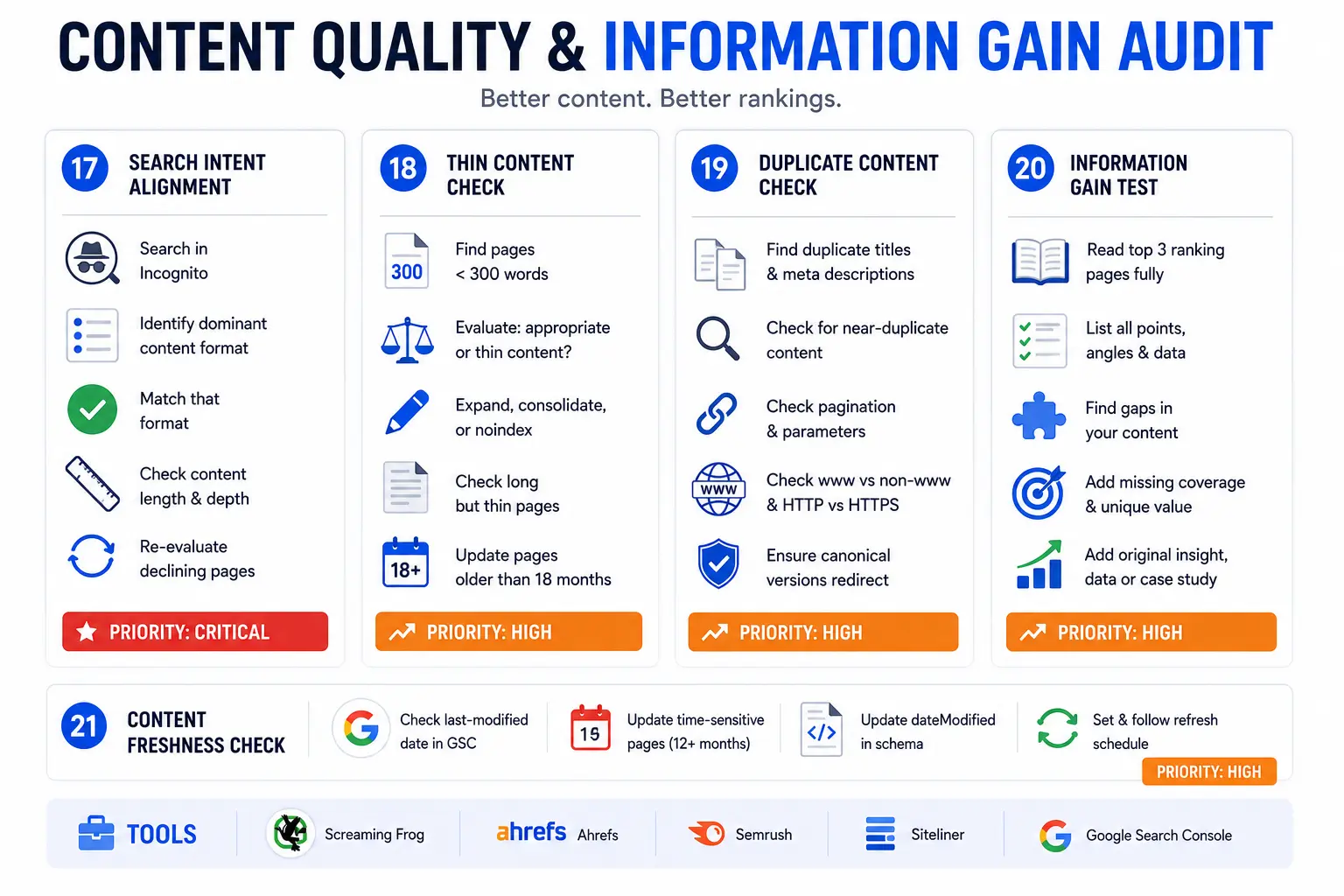
The core test for every page is simple: does this content answer the searcher's question better than the five pages currently outranking it?
Checklist 17: Search Intent Alignment
Search intent is the primary reason a user types a specific query. A page built around the wrong content format fails even when the keyword targeting, technical SEO, and backlink profile are all strong.
Run these checks:
- Search your primary target keyword in Google in Incognito mode
- Identify the dominant content format ranking on page one: is it a step-by-step guide, a listicle, a comparison, a product page, a video, or a tool?
- Confirm your page matches that dominant format. If the SERP shows step-by-step guides and you published a comparison page, your format misalignment directly limits your ranking ceiling
- Check the dominant content length and depth among the top 3 results. A 500-word post does not outrank a 4,000-word comprehensive guide on a complex informational query
- Re-evaluate the search intent of any page that has declined significantly in rankings over the past 90 days. Intent shifts are a common cause of ranking drops that feel unexplainable
Tools: Manual SERP analysis in Incognito mode, Ahrefs SERP Overview, Semrush Keyword Overview
Priority: Critical
Checklist 18: Thin Content Check
Thin content is content that provides little or no unique value to the reader. It fails Google's Helpful Content system and signals low quality at the site level, which can pull down rankings for stronger pages on the same domain.
Run these checks:
- In Screaming Frog, go to Content > Words and filter for pages under 300 words
- Evaluate each short page: is the short length appropriate (contact page, thank-you page, landing page with a specific conversion goal) or is it a thin content problem?
- For informational blog posts and service pages under 500 words targeting competitive keywords, this is almost always a problem. The options are: expand the content to match the depth competitors provide, consolidate the page with a closely related page using a 301 redirect, or add a noindex tag and exclude the page from the index
- Check for pages that are long but thin. A 2,000-word page full of padding, generic advice, and repeated points is thin content despite its word count
- Review pages published more than 18 months ago that have not been updated. Outdated statistics, expired references, and changed best practices turn strong content into thin content over time
Tools: Screaming Frog Content > Words, Copyscape, Siteliner
Priority: High
Checklist 19: Duplicate Content Check
Duplicate content creates a situation where Google must choose which version of a page to rank, often choosing a version you did not intend and splitting ranking signals across multiple URLs.
Run these checks:
- In Screaming Frog, check for duplicate title tags and duplicate meta descriptions as a proxy for duplicate page content
- Run Siteliner on your domain to identify near-duplicate content across internal pages
- Check pagination handling: blog pages 2, 3, and 4 should use canonical tags pointing to the first page or use rel=next and rel=prev markup
- Check URL parameter handling: if your site generates separate URLs for filtered or sorted versions of the same page (like
/products?color=bluevs/products?color=red), those duplicate pages need canonical tags pointing to the primary URL - Check for www vs non-www and HTTP vs HTTPS versions of every page. Each should redirect to the canonical version in a single hop
Tools: Screaming Frog, Siteliner (siteliner.com), Google Search Console > URL Inspection
Priority: High
Checklist 20: Information Gain Test
Google's Information Gain patent describes a ranking signal that rewards pages covering angles, facts, or perspectives that existing top-ranking results do not include. A page that only repeats what the top 5 results already say has zero information gain and no reason to outrank them.
Run these checks:
- Pull the top 3 ranking pages for each of your target keywords and read them fully
- List every major point, section, angle, and piece of data they cover
- Compare against your page: identify every gap, every topic your competitors cover that you have missed, and every angle none of them have taken
- Add the missing coverage to your page. This is the core content gap analysis
- Add at least one element that no competitor covers: original data from your client work, a specific case example from your own experience, an updated statistic from a source that post-dates the competitors' content, or a clearer process explanation based on what you actually do for clients
Experience note: In our content audits for clients, information gain gaps are the single biggest cause of pages stuck between positions 5 and 15. The pages are well-structured and technically sound but offer no meaningful differentiation from the content already ranking above them. Adding one original insight or one fresh data point consistently moves pages up 3-8 positions within 60 days. This is also where a clear SEO strategy helps connect editorial priorities to ranking goals.
Tools: Manual competitor review, Ahrefs Content Gap, Semrush Content Gap
Priority: High
Checklist 21: Content Freshness Check
Google rewards freshness for queries where recent information matters. Statistics pages, tool comparison posts, algorithm guides, and strategy articles all decay in relevance as the world changes around them.
Run these checks:
- Pull the last-modified date from Google Search Console's URL Inspection for each key page
- Flag any page covering time-sensitive topics (algorithm updates, tool comparisons, pricing, statistics, best practices) that has not been updated in the past 12 months
- Update the
dateModifiedproperty in your Article schema on every meaningful revision. Google uses this to assess content freshness - Set a refresh schedule by content type and stick to it:
| Content Type | Recommended Review Cycle |
|---|---|
| Statistics and data posts | Every 3-6 months |
| Tool comparison pages | Every 6 months |
| Strategy and how-to guides | Every 12 months |
| Evergreen definition posts | Every 18-24 months |
| News and event coverage | As needed |
Tools: Google Search Console URL Inspection, Ahrefs Content Explorer, your editorial calendar
Priority: Medium
Checklist 22-24: Backlink Profile Audit
The backlink profile is how much external authority your domain has accumulated. It directly affects how competitive you are in high-difficulty keyword SERPs. A strong backlink profile gives Google more confidence in your content. A toxic or manipulative profile puts you at risk of a manual action.
Checklist 22: Backlink Profile Overview
Understanding your current backlink profile establishes the competitive baseline for your domain authority and link-building gaps.
Run these checks:
- Pull your full backlink profile from Ahrefs Site Explorer or Semrush Backlink Analytics
- Record: total referring domains count, domain authority/rating distribution, top linked pages, and anchor text spread
- Flag any sudden spike in referring domains over a short period. Google's Penguin algorithm detects unnatural link velocity patterns and can suppress rankings
- Compare your referring domain count against the top 3 ranking competitors for your primary target keywords. The gap tells you the approximate link-building effort needed to compete
- Identify your most-linked pages and verify those pages still exist, still rank, and still match the anchor text profile of the links pointing to them
Tools: Ahrefs Site Explorer, Semrush Backlink Analytics, Moz Link Explorer
Priority: High
Checklist 23: Toxic Link Check
Toxic backlinks come from spammy, irrelevant, or manipulative sources. Google's Penguin algorithm devalues or ignores most low-quality links automatically. Active disavowal is only necessary when a manual action has been issued or when the pattern of toxic links is extreme enough to put the domain at significant risk.
Run these checks:
- In Ahrefs, filter your backlink profile for links from domains with a Domain Rating (DR) below 10 coming from irrelevant topics or clearly spammy sites (thin content, no organic traffic, unrelated industries)
- Check your anchor text distribution. A heavy concentration of exact-match commercial keyword anchors (more than 20-30% of your backlink profile) is an over-optimization risk signal
- If you received a manual action notification in Google Search Console, build a disavow file immediately for the toxic domains identified in your audit
- Do not disavow aggressively without a manual action. Unnecessary disavowal can remove equity from legitimate links that Google already credits
Tools: Ahrefs Backlink Profile, Semrush Backlink Audit Tool, Google Search Console Manual Actions
Priority: Medium
Checklist 24: Lost and Broken Backlink Recovery
Recovering lost backlinks is one of the highest-ROI link-building activities available. Every link that pointed to your site and no longer works represents link equity that has already been earned but is not being delivered.
Run these checks:
- In Ahrefs Site Explorer, go to Backlinks > Lost and filter the date range to the past 90 days
- For every lost link where the target URL returns a 404, create a 301 redirect from the dead URL to the most relevant live page. This immediately restores the link equity
- For links that were removed from the linking page (the linking site took down the link or the page), reach out to the site owner and request the link be restored or updated to point to your current content
- For links pointing to pages that have moved without proper redirects (common after redesigns), implement direct 301 redirects from the old URLs to the new ones
Experience note: In a backlink audit for a B2B client, we found 47 high-quality links pointing to URLs returning 404 errors after a domain migration. Adding 301 redirects for all 47 URLs and recovering 18 of the removed links contributed to a 31% increase in domain authority within four months.
Tools: Ahrefs Lost Backlinks, Semrush Backlink Audit, Majestic
Priority: Medium
Checklist 25-27: Structured Data and Schema Audit
Structured data (JSON-LD schema markup) is how you declare entities, attributes, and relationships to search engines in a machine-readable format. It enables rich results (FAQ boxes, HowTo steps, star ratings) in Google search, reduces the Cost of Retrieval for AI engines, and increases the likelihood of being cited in Google AI Overviews and other answer engines. When validating markup, it helps to cross-check with Google's Rich Results Test.
Checklist 25: Schema Implementation Review
A majority of websites have no schema markup at all. Many that have it have errors that prevent it from qualifying for rich results.
Run these checks:
- Run your homepage and 5-10 key pages through Google's Rich Results Test at search.google.com/test/rich-results
- Flag every page with zero schema markup. At minimum, every page should carry Organization schema and BreadcrumbList schema
- Check for schema implemented in the CMS (Yoast, Rank Math) vs. schema in the page HTML. CMS plugins sometimes generate malformed JSON that fails validation even though the plugin reports success
- In Google Search Console, go to Enhancements and review all structured data reports for errors and warnings
Tools: Google Rich Results Test, Google Search Console > Enhancements, Schema.org Validator
Priority: High
Checklist 26: Schema Type Coverage by Page
Different page types need different schema types. Using a generic WebPage schema on a how-to guide or a service page misses the rich result opportunities that page-specific schema types open up.
Required schema by page type:
| Page Type | Schema Required |
|---|---|
| Blog post / guide | Article, FAQPage, BreadcrumbList |
| Service page | Service, Organization, FAQPage |
| Location / local page | LocalBusiness, FAQPage, BreadcrumbList |
| How-to guide | HowTo, Article, FAQPage |
| Product page | Product, Review, FAQPage |
| Homepage | Organization, WebSite, Sitelinks SearchBox |
| Author bio page | Person, Organization |
| About page | Organization, Person |
Run these checks:
- Map every page type on your site to its required schema types using the table above
- Verify each schema type is correctly implemented by running it through the Rich Results Test
- Add
Speakableschema to direct-answer passages in your long-form guides. Speakable markup signals to AI engines which passages are the most citable excerpts on the page
Tools: Google Rich Results Test, Screaming Frog Custom Extraction (for JSON-LD), Schema.org
Priority: High
Checklist 27: Structured Data Error Fix
Schema errors prevent rich result eligibility entirely. Schema warnings reduce confidence but do not eliminate eligibility. Fix errors first, then warnings.
Run these checks:
- In Google Search Console > Enhancements, export all structured data errors and warnings grouped by type
- For each Critical error: identify the required field that is missing or malformed, add the correct value, and re-check using the Rich Results Test
- Common errors to look for: missing
nameproperty in Organization schema, missingdatePublishedin Article schema, missingacceptedAnswerin FAQPage schema, incorrectly nested schema types - After fixing errors, resubmit the affected URLs in Google Search Console for re-crawling
- Re-run the Rich Results Test on every fixed page to confirm the error is resolved before closing the fix
Common fix: FAQPage schema fails validation when the Question and Answer types are not nested correctly within the mainEntity array. Review the Google schema documentation for the exact structure required.
Tools: Google Rich Results Test, Google Search Console > Enhancements, Schema.org FAQPage documentation
Priority: Medium
Checklist 28-29: AEO and GEO Audit (AI Search Visibility)
Google AI Overviews appear in over 40% of searches in 2026. ChatGPT, Perplexity, and Gemini now drive measurable referral traffic to websites. If your content is not structured for AI extraction and citation, you are invisible in a rapidly growing search channel.
This is the audit layer that almost no competitor covers at meaningful depth. AEO (Answer Engine Optimization) and GEO (Generative Engine Optimization) are not replacements for traditional SEO. They are extensions of it, applied at the passage level.
Checklist 28: AEO (Answer Engine Optimization) Audit
An AEO audit checks whether your content structure allows AI answer engines to extract, understand, and cite your content as a direct response to user queries.
The core principle: 44.2% of all LLM citations come from the first 30% of a page's text (Growth Memo, February 2026). If your most important information sits behind two paragraphs of background, AI engines rarely reach it.
Run these checks:
Direct-Answer Block
- Read the first 100 words of each key page. Do they contain a clear, direct answer to the primary query?
- Every page should open with a 40-70 word definition or direct answer that works as a standalone excerpt. This is your primary citation surface for AI engines.
- Example of a direct-answer block that AI engines can extract: "An SEO audit is a structured review of a website's technical health, on-page optimization, content quality, backlink profile, and AI search visibility. It identifies issues preventing pages from ranking on Google or getting cited by AI engines like ChatGPT and Perplexity."
Question-Format Headings
- Convert generic H2 and H3 headings into natural language questions that mirror the way users phrase queries in ChatGPT or Perplexity
- Before: "Technical SEO" / After: "Technical SEO Checks That Affect Crawlability"
- Before: "Backlinks" / After: "How to Audit Your Backlink Profile for Toxic Links"
FAQ Section
- Add a structured FAQ section to every key page with at least 5-8 question-and-answer pairs
- Apply FAQPage JSON-LD schema to every FAQ section
- Write answers as self-contained passages of 40-80 words. Short, direct, complete.
Named Entity Density
- Check that your content mentions specific named tools (Screaming Frog, Ahrefs, Google Search Console), named organizations (Google, Semrush), named methodologies (E-E-A-T, TF-IDF, Helpful Content), and specific numbers and dates
- Entity density is a proxy for factual richness. AI engines prefer citing content that grounds claims in named, verifiable facts
Definition Blocks
- Define every key term the first time you use it. AI engines cite explicit definitions more than explanations.
- Format: "[Term] is [concise definition in one sentence]."
Speakable Schema
- Add Speakable markup to your direct-answer passages to signal to Google which sections are the highest-value excerpts for voice search and AI extraction
Manual test: Type your 5 primary target questions into ChatGPT, Perplexity, and Gemini. Note which sources get cited. Open those pages and compare their content structure with yours. The structural differences reveal your AEO gaps.
Tools: Manual testing in ChatGPT, Perplexity, Gemini; AEO Article Analyzer; Google Rich Results Test (for FAQPage and Speakable schema); our AEO optimization services for a managed audit
Priority: High
Checklist 29: GEO (Generative Engine Optimization) Audit
A GEO audit checks your brand's citation readiness across the full web, not just your own site. AI models build recommendations from thousands of data points across the entire internet, including third-party mentions, directories, Wikipedia entries, and forum discussions. Your own website is just one input. For more context on this layer, our GEO explainer breaks down how generative search systems decide what to cite.
Run these checks:
AI Bot Crawlability
- Open your robots.txt file and check whether GPTBot, PerplexityBot, or ClaudeBot are blocked
- A
Disallow:rule for any of these bots prevents that AI engine from reading your content entirely - Most sites block these bots unintentionally through wildcard Disallow rules added for other purposes. Check explicitly.
llms.txt File
- Check whether your domain has a
/llms.txtfile. This file, analogous to robots.txt for AI engines, signals which content AI crawlers should prioritize - If no llms.txt file exists, create one. List your most important pages, your brand description, and your primary service areas
Brand Entity Consistency
- Search your exact brand name across your website, LinkedIn company page, Crunchbase profile, G2 profile, and any Wikipedia mention
- Your brand name, founding year, location, and description must be consistent across all sources. Inconsistency reduces AI confidence in your brand entity and lowers citation frequency
- Check that your Organization schema includes
sameAsproperties linking to all official brand profiles
Third-Party Brand Mentions
- Search Google for your brand name and identify every third-party site that mentions you: listicles ("best SEO agencies"), comparison posts, directory listings, client testimonials, press mentions, and industry roundups
- AI models weight third-party mentions heavily when forming brand recommendations. A brand mentioned across multiple independent sources is more citable than one known only from its own website
- Identify the top 10 listicles and "best [service] agencies" pages in your niche that do not currently mention you. These are link-building and mention-acquisition targets
Wikipedia and Knowledge Graph Presence
- Check whether your brand or key personnel (founder, CEO) have a Wikipedia entry or a Google Knowledge Panel
- Wikipedia is a primary training data source for major LLMs including GPT-4, Gemini, and Claude. A Wikipedia entry significantly increases citation likelihood
- Establish a Wikidata entity for your organization as a first step toward Knowledge Graph inclusion
Authoritative Citations in Your Content
- Check that your key pages cite authoritative external sources: Google Search Central documentation, peer-reviewed research, official industry standards, .gov and .edu resources
- AI models use outbound citation quality as a trust proxy. Pages that cite strong sources are more trusted and therefore more citable
GEO Baseline Test
- Run your brand name and primary service ("SEO audit services [city]") as prompts in ChatGPT, Perplexity, and Gemini
- Record whether you are recommended, listed as an alternative, or absent
- Repeat this test every 30 days after publishing new content to track citation growth over time
For a complete managed GEO audit and citation strategy, see our GEO optimization services.
Tools: Manual testing in ChatGPT, Perplexity, Gemini; robots.txt file check; Ahrefs Brand Radar; Otterly.ai for citation monitoring; Google Knowledge Graph Search API
Priority: High
Checklist 30: Build Your Prioritized Fix List
An audit without a prioritized action plan is a document, not a strategy. Every finding from the 29 checklists above goes into this final step, organized by impact and execution order.
The fix list framework:
Group every issue from your audit into four priority tiers. Work top to bottom, not by personal preference or ease of execution.
| Priority | Criteria | Fix Timeline | Example Findings |
|---|---|---|---|
| Critical | Actively blocking indexation or traffic | 24-48 hours | Noindex on live pages, sitewide robots.txt block, 404 on top landing pages, no HTTPS |
| High | Directly limiting rankings or AI visibility | Within 1 week | Missing canonical tags, LCP above 4s, zero schema on key pages, thin content on primary pages |
| Medium | Limiting growth but not blocking it | Within 30 days | Orphan pages, missing FAQs, no AEO structure, duplicate meta descriptions |
| Low | Incremental improvements | Within 90 days | Minor alt text gaps, anchor text fine-tuning, small redirect chain cleanups |
Building the fix list document:
For each issue, record: the affected URL or page type, the specific problem identified, the recommended fix, the tool used to identify it, the priority level, and the team member responsible for the fix.
A fix list without ownership and deadlines does not get executed. Assign every item to a specific person with a specific completion date.
The sprint structure we use with clients:
- Sprint 1 (Week 1): All Critical issues. These are often fast fixes with outsized impact.
- Sprint 2 (Weeks 2-3): All High priority issues. These require more work but directly improve rankings.
- Sprint 3 (Month 1): Medium priority issues. These build on the gains from the first two sprints.
- Backlog: Low priority items. Schedule these into regular maintenance cycles.
Running an SEO audit manually using this 30-checklist framework takes 10-20 hours for a mid-size site of 50-200 pages. For enterprise sites with 1,000+ pages, expect 2-3 days of focused work. Getting the audit wrong costs far more in time and missed revenue.
If you want A1 Technovation's team to run a full SEO audit and deliver a prioritized fix list within 5 business days, see our SEO services for details.
SEO Audit Quick Reference: All 30 Checklists at a Glance
| # | Checklist Item | Category | Priority |
|---|---|---|---|
| 1 | Crawlability check | Technical | Critical |
| 2 | Index coverage review | Technical | Critical |
| 3 | XML sitemap audit | Technical | High |
| 4 | HTTPS and security | Technical | High |
| 5 | Redirect audit | Technical | High |
| 6 | LCP audit | Core Web Vitals | High |
| 7 | INP audit | Core Web Vitals | High |
| 8 | CLS audit | Core Web Vitals | Medium |
| 9 | Mobile usability | Core Web Vitals | High |
| 10 | Overall page speed | Core Web Vitals | High |
| 11 | Title tag audit | On-Page | High |
| 12 | Meta description audit | On-Page | Medium |
| 13 | H-tag hierarchy | On-Page | High |
| 14 | Keyword and TF-IDF check | On-Page | High |
| 15 | Internal link audit | On-Page | High |
| 16 | Image optimization | On-Page | Medium |
| 17 | Search intent alignment | Content | Critical |
| 18 | Thin content check | Content | High |
| 19 | Duplicate content check | Content | High |
| 20 | Information gain test | Content | High |
| 21 | Content freshness check | Content | Medium |
| 22 | Backlink profile overview | Off-Page | High |
| 23 | Toxic link check | Off-Page | Medium |
| 24 | Lost backlink recovery | Off-Page | Medium |
| 25 | Schema implementation review | Structured Data | High |
| 26 | Schema type coverage | Structured Data | High |
| 27 | Structured data error fix | Structured Data | Medium |
| 28 | AEO audit | AI Visibility | High |
| 29 | GEO audit | AI Visibility | High |
| 30 | Prioritized fix list | Strategy | Critical |
Frequently Asked Questions (FAQs)
How often should you run an SEO audit?
Run a full SEO audit quarterly for active sites receiving regular updates. High-volume e-commerce or news sites benefit from monthly crawl reviews for the technical layer. At minimum, run a complete audit after every major site redesign, CMS migration, or confirmed Google core update.
How long does an SEO audit take?
A complete audit using this 30-checklist framework takes 3-7 hours for a mid-size site of 50-200 pages when done manually by an experienced SEO. Enterprise sites with 1,000+ pages typically require 2-3 days. Using dedicated audit tools like Semrush Site Audit or Screaming Frog speeds up the crawl phase significantly but the analysis and fix prioritization still require human judgment.
Can you run a free SEO audit?
Yes. Google Search Console, GA4, Google PageSpeed Insights, and Screaming Frog (free up to 500 URLs) cover the core technical and on-page audit areas without cost. For backlink profile analysis and keyword ranking data, paid tools like Ahrefs or Semrush provide significantly more accurate and complete data than free alternatives.
Is there a difference between a technical SEO audit and a full SEO audit?
A technical SEO audit covers only the crawlability, indexation, site speed, and structural issues. A full SEO audit adds on-page optimization, content quality, backlink profile, structured data, and AI visibility checks. This 30-checklist guide covers all six layers. For most sites, running only a technical audit misses the content and authority issues that are the actual cause of ranking underperformance.
Is an AEO audit a separate process from an SEO audit?
An AEO audit checks whether your content is structured for extraction and citation by AI answer engines like ChatGPT, Perplexity, and Google AI Overviews. It reviews direct-answer blocks, FAQ schema, question-format headings, named entity density, and Speakable markup. Checklists 28 and 29 in this guide integrate the AEO and GEO audit into the standard SEO audit process. They should not be separate processes. Every page you audit for SEO should also be checked for AEO and GEO readiness.
Do you need to disavow toxic backlinks?
Google ignores most low-quality links automatically through the Penguin algorithm. Disavowal is only necessary when Google has issued a manual action against your site for unnatural links, or when the toxic link pattern is extreme enough to put the domain at material risk. Disavowal should be done carefully with assistance from an experienced SEO. Unnecessary disavowal of legitimate links can remove link equity your rankings depend on.
Are Core Web Vitals a ranking factor in 2026?
Yes. Google uses LCP, INP, and CLS as confirmed page experience ranking signals. INP replaced FID as a Core Web Vitals metric in March 2024. Pages meeting the Good threshold across all three metrics gain a ranking advantage in competitive SERPs where content quality between competing pages is otherwise similar. Pages with poor Core Web Vitals scores are at a disadvantage regardless of how strong their content and links are.
Does an SEO audit improve AI search visibility?
Checklists 28 and 29 in this guide cover the AEO and GEO layers specifically. An SEO audit reveals whether AI bots (GPTBot, PerplexityBot, ClaudeBot) are blocked in your robots.txt, whether your content structure enables AI extraction through direct-answer blocks and FAQ schema, and whether your brand entity signals are consistent enough for AI engines to cite you confidently. These checks directly improve your visibility in ChatGPT, Perplexity, Google AI Overviews, and Gemini.
Build from audit to execution
These companion pages turn SEO audit findings into technical fixes, on-page improvements, and full growth planning.
Written by Likhon Ahmed, Founder and CEO of A1 Technovation. Likhon has 7+ years of hands-on SEO experience working with 150+ clients across the USA, UAE, Qatar, Saudi Arabia, and Bahrain. A1 Technovation has been a full-stack digital marketing agency since 2018, specializing in technical SEO, AEO, and GEO for businesses that need to rank on Google and get cited by AI engines.
Need a Prioritized SEO Audit Action Plan?
A1 Technovation helps teams fix the technical, on-page, content, and AI-visibility blockers that stop good websites from ranking.
Talk to our team →